
10 Best AI Video Generators for Faceless YouTube Channels in 2026 (Real Costs, Real Workflows)
We compared 10 AI video generators for faceless YouTube channels in 2026 — real creator-reported costs, an honest look at one-click vs. manual workflows, and which tool actually fits your format and budget, not just the highest-rated demo reel.

Umer Khan has spent the last two years building and testing AI-assisted content workflows for YouTube, from scripting to 2D animation. He writes about what actually works in AI video production including the parts that don't.
Quick Answer
There is no single "best" AI video generator for every faceless channel. The tool that fits depends on your video length, your budget, and how much manual control you want.
- Best overall for beginners: InVideo AI — prompt-led, bundles script, voiceover, and stock/AI clips (~$9/mo)
- Best for daily Shorts on a budget: Kling AI — strong prompt adherence, natural motion, good credit economy (~$10/mo)
- Best free-tier option: Canva, paired with Magic Media for AI clips
- Best for presenter-style/talking-head content without showing your face: HeyGen — 300+ AI avatars with lip-sync (~$29/mo)
- Best for long-form script-to-video (10+ min): Pictory or InVideo AI, for turning scripts/blog posts into structured video
If you already edit in CapCut or Premiere and just need clips, skip the "all-in-one" platforms — a lot of experienced creators on Reddit say you get more control (and often spend less) stitching together a dedicated image tool, a video-animation tool, and a voice tool yourself. More on that trade-off below.
Quick Overview: 10 AI Video Generators Compared
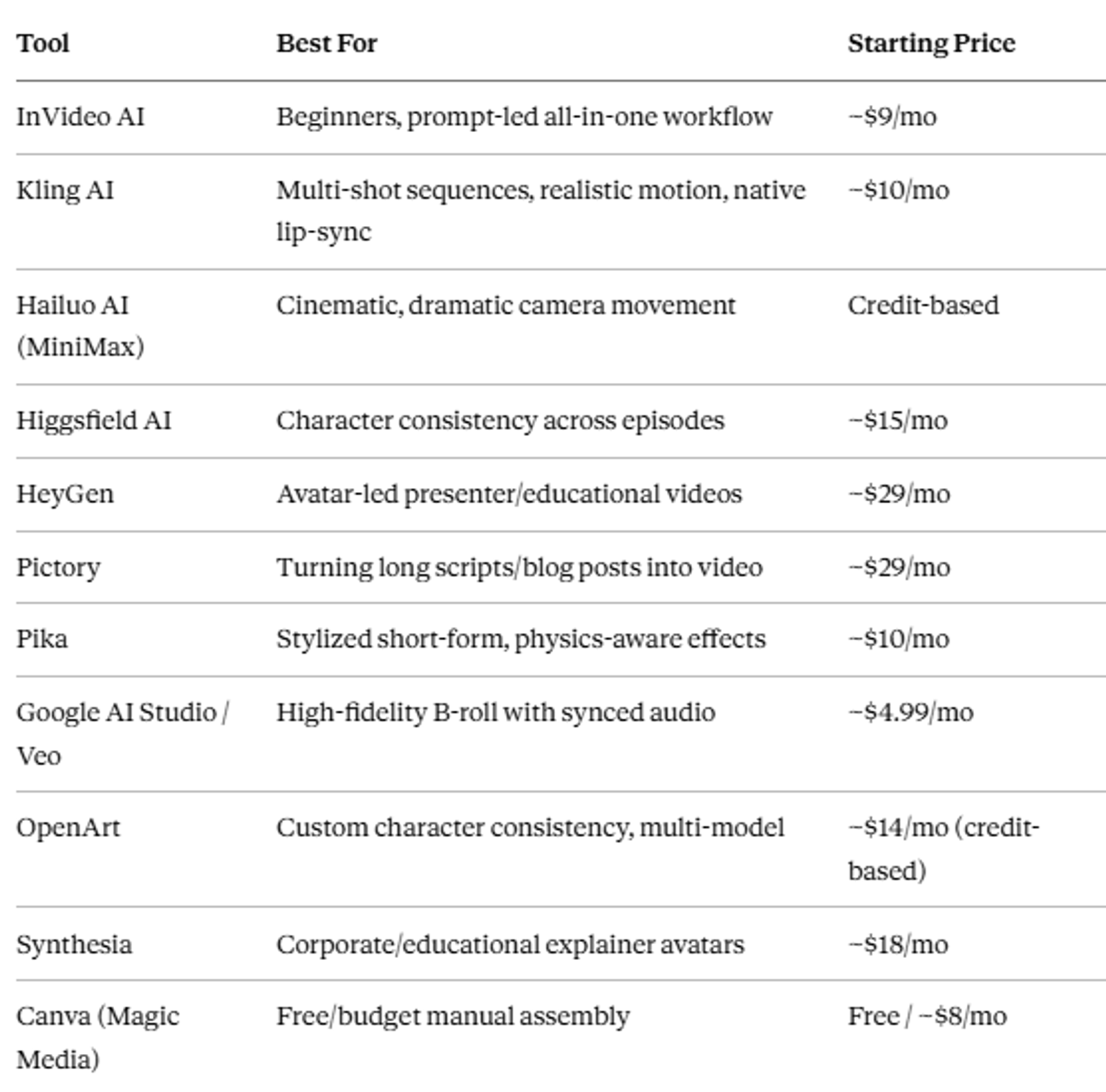
Pricing is based on publicly listed entry tiers as of writing. AI tool pricing changes often — verify current rates on each provider's site before you commit a budget.
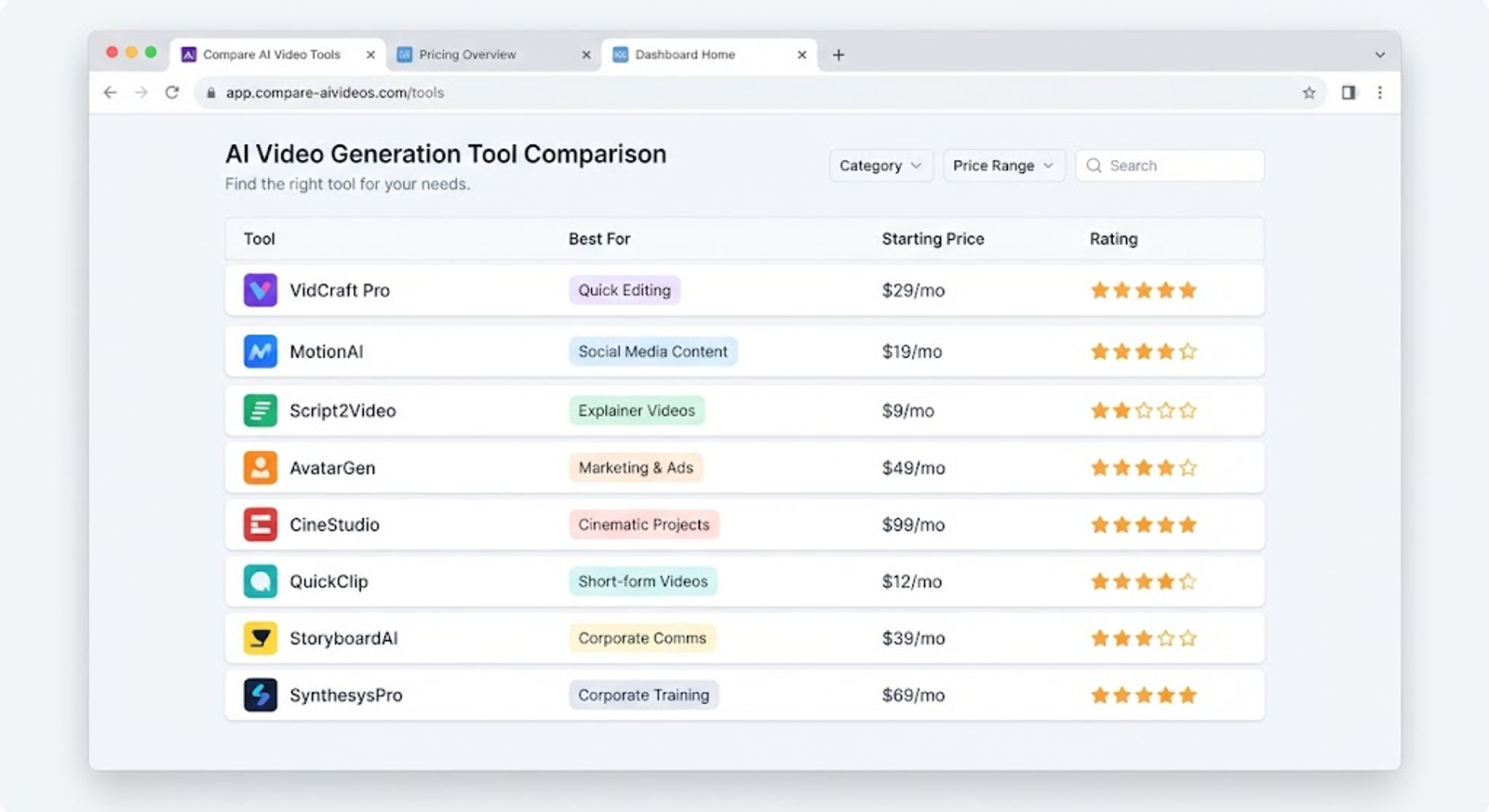
How We Picked These
This list is built from three sources: current publicly listed pricing and feature pages for each tool, Google's own AI Overview summary of the space, and real workflow discussions from creators on Reddit and Quora who are actually running faceless channels — not just marketing copy from the tools themselves. Where a claim comes from a specific Reddit or Quora thread, it's flagged as such rather than presented as our own tested result, since we haven't run every tool on this list ourselves yet.
What Counts as an "AI Video Generator" for a Faceless Channel?
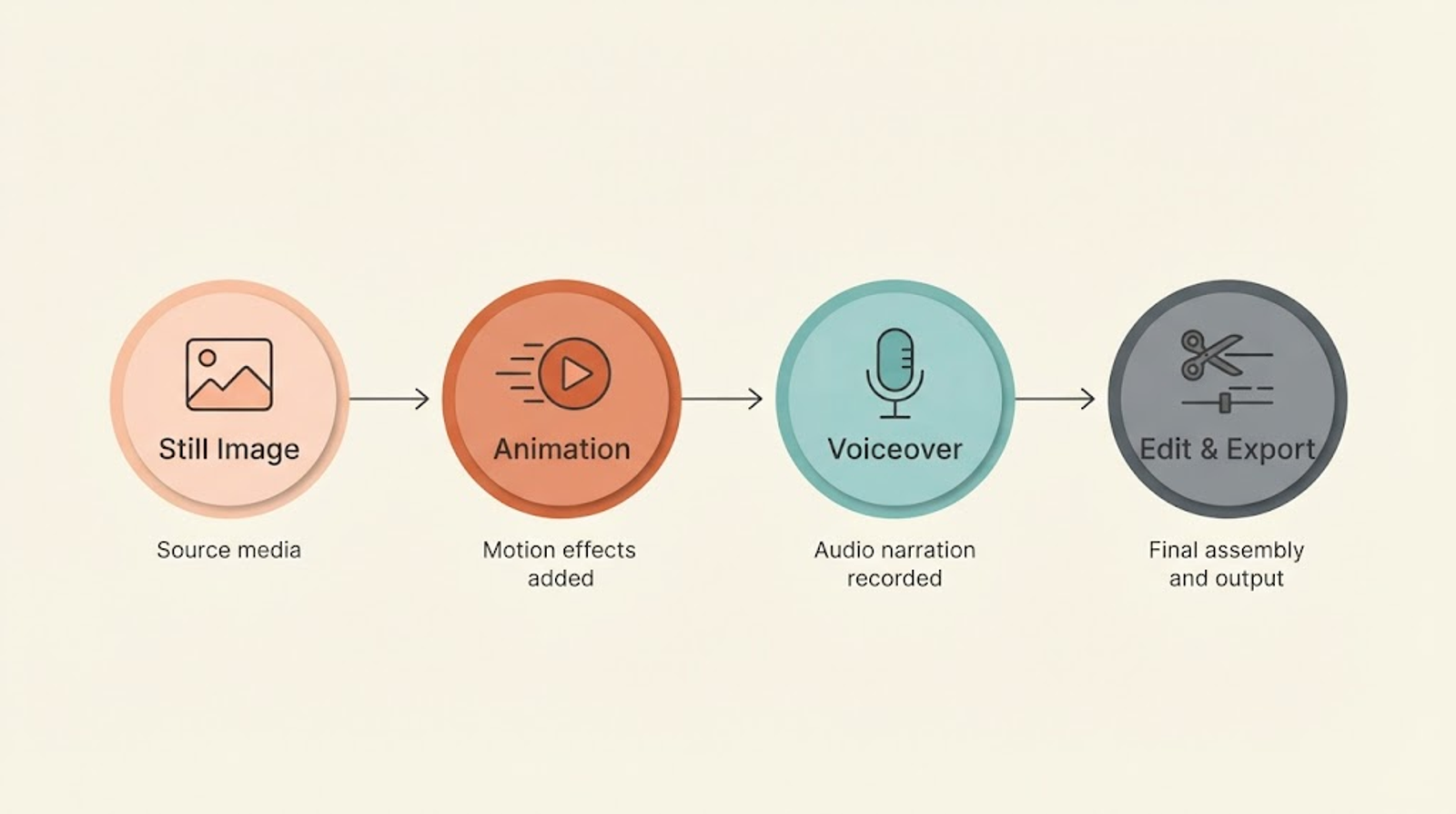
Most tools on this list do one of two jobs, not both. Text-to-video tools generate a moving clip directly from a text prompt. Image-to-video (I2V) tools take a still image you already generated (in Midjourney, Flux, or the tool's own image model) and add motion — a pan, a zoom, a subtle animation — to it.
The distinction matters more than the marketing pages suggest. Several experienced creators on Reddit specifically recommend I2V over pure text-to-video for one reason: cost control. Text-to-video reroll after reroll to fix a distorted hand or an extra finger burns through your monthly generation credits fast. Generating a clean still image first, then animating only the stills you already like, wastes far less.
Some tools on this list (HeyGen, Synthesia) skip both of these and instead animate a talking avatar reading your script — useful if your format is closer to a "presenter" video than a cinematic story.
The 10 Tools, Broken Down
1. InVideo AI
Why we picked it: It's the most beginner-friendly entry point on this list — you type a prompt, and it assembles a script, voiceover, and a mix of stock and AI-generated clips into a rough cut you can then edit.
- Pros: Low starting price (~$9/mo), handles the whole pipeline in one place, good for someone who doesn't yet know which piece of the workflow they'll enjoy
- Cons: Less creative control than building your own pipeline; output style can look generic if you don't customize it
- Who it's for: Someone testing whether they even like making faceless videos before investing in a multi-tool setup
2. Kling AI
Why we picked it: Multiple sources in our research — both the current market data and independent Reddit discussion — point to Kling as one of the strongest value picks for daily-volume creators right now, specifically for multi-shot sequences with realistic human motion and native lip-sync.
- Pros: Strong prompt adherence (fewer wasted generations), natural-looking motion physics, reasonable entry price (~$10/mo)
- Cons: Still an image-to-video/text-to-video generator, not a full editing suite — you'll still assemble the final video elsewhere
- Who it's for: Creators publishing Shorts or short-form video daily who need to stretch a monthly credit budget
3. Hailuo AI (MiniMax)
Why we picked it: Recommended specifically for content that needs dramatic, cinematic camera movement — flying shots, sweeping zooms, atmospheric lighting — beyond what most competitors handle smoothly.
- Pros: Strong at fluid, high-drama motion; punches above its price point according to Reddit users who've compared it directly against pricier tools
- Cons: Credit-based pricing can be harder to budget for than a flat monthly plan if your output volume is inconsistent
- Who it's for: Story-driven or documentary-style faceless channels where visual drama matters more than character consistency
4. Higgsfield AI
Why we picked it: The standout feature here is character consistency across multiple episodes — useful if your channel has a recurring animated "host" or character.
- Pros: Purpose-built for episodic/series-style animated content
- Cons: Starting price (~$15/mo) is higher than pure clip generators; overkill if you don't need a recurring character
- Who it's for: Channels building a serialized format, not one-off videos
5. HeyGen
Why we picked it: If your format is closer to "a person explaining something on camera" but you don't want to show your own face or voice, HeyGen's 300+ AI avatars with multilingual lip-sync solve that specific problem directly.
- Pros: Avatar + lip-sync in one tool, useful for educational or explainer-style content, multilingual output
- Cons: Highest starting price on this list (~$29/mo); avatar-based content has a distinct "AI presenter" look that some audiences respond to negatively
- Who it's for: Educational or how-to channels that want a consistent on-screen "presenter" without appearing on camera
6. Pictory
Why we picked it: Built specifically to turn long-form text — a script, a blog post, an article — into a structured video, which fits channels repurposing existing written content into video form.
- Pros: Good at handling large text inputs without losing narrative structure, useful if you already write scripts or blog posts
- Cons: Starting price (~$29/mo) is on the higher end for what's essentially a script-to-video assembly tool, not a from-scratch generator
- Who it's for: Creators repurposing blog content, long scripts, or existing written material into video
7. Pika
Why we picked it: Specifically called out for stylized short-form content with physics-aware visual effects — leans more toward creative/stylized output than photorealism.
- Pros: Distinct visual style, good entry price (~$10/mo)
- Cons: The stylized look won't suit every niche — a finance or news-style channel probably wants something more grounded
- Who it's for: Shorts-first channels in creative or entertainment niches where a stylized look is a feature, not a bug
8. Google AI Studio / Veo
Why we picked it: The standout here is native synchronized audio generated alongside the video — most competitors generate silent clips you then have to score separately.
- Pros: Lowest listed starting price on this entire list (~$4.99/mo), high-fidelity output, saves a step by generating audio and video together
- Cons: Newer to the market than some competitors, workflow/interface still maturing
- Who it's for: Budget-conscious creators who want B-roll with built-in audio rather than assembling sound separately
9. OpenArt
Why we picked it: Multi-model access with custom character consistency outside of standard stock footage — useful if you need the same character to look identical across an entire video, not just one scene.
- Pros: Access to multiple underlying AI models in one place, strong character consistency tools
- Cons: Credit-based pricing (~$14/mo starting) means heavy users need to watch consumption closely
- Who it's for: Creators who need a specific, consistent original character rather than generic B-roll
10. Canva (with Magic Media)
Why we picked it: The most realistic free or near-free entry point on this list, especially for someone doing manual assembly rather than wanting a full auto-generated pipeline.
- Pros: Genuinely usable free tier, familiar editing interface if you've used Canva for thumbnails already, low-cost Pro tier (~$8/mo)
- Cons: AI clip quality and consistency generally trail dedicated video-generation tools; better suited to assembly than generation
- Who it's for: Beginners on a near-zero budget who are willing to do more manual editing work themselves
What Else You Need Besides the Generator
None of the 10 tools above cover the whole production chain by themselves, and pretending otherwise is how beginners overspend on one subscription instead of the two or three pieces they actually need.
- A standalone voice tool. If a platform's built-in narration sounds flat, ElevenLabs is the default standalone choice for a specific, consistent voice identity that isn't tied to one generator's library.
- An assembly/finishing tool. Raw generated clips almost always need a finishing pass — timing, caption styling, music levels. CapCut (free) handles this for most creators without adding another paid subscription.
- A repurposing tool. If you're turning long-form videos into Shorts/Reels for other platforms, Opus Clip is the tool creators mention most often for finding the strongest moments automatically rather than re-cutting by hand.
Do You Need Auto-Posting, or Can You Upload Manually?
This is a real fork in which tool fits you, and it's worth deciding before you subscribe to anything. Most of the 10 tools above export a finished video file and stop there — you still upload it to YouTube (and TikTok, Instagram, etc.) yourself. A smaller group of tools build scheduling and direct multi-platform publishing into the product, so a video goes from script to live post without you touching an upload button.
If you're publishing daily and manual uploads across 2–3 platforms are eating real time, that's worth weighing against a slightly higher subscription cost. If you're publishing a few times a week and want to review each video before it goes live anyway, the export-and-upload-yourself model isn't actually costing you anything — you weren't going to skip the review step either way.
The Real Cost of Making Faceless Videos (What Creators Actually Pay)
Marketing pages list starting prices. They don't tell you what a finished video actually costs once you account for regenerations, voice, and music. Two separate Reddit discussions gave real numbers worth factoring into your budget:
- One creator building 8–10 minute story-based faceless videos estimated $60–80 in pure video-generation costs per video for high-mid quality animated visuals — not counting the time spent, and not counting other tools like voice or editing software. They noted the number goes up fast with regenerations, and down significantly for pure slideshow-style "slop" content.
- A separate creator publishing daily 15–30 second Shorts estimated $20–30/month total across their whole tool stack (voice + visual generation), using a pipeline of ElevenLabs for voiceover, Kling or Hailuo AI for 3–5 short animated clips per Short, and CapCut for free assembly.
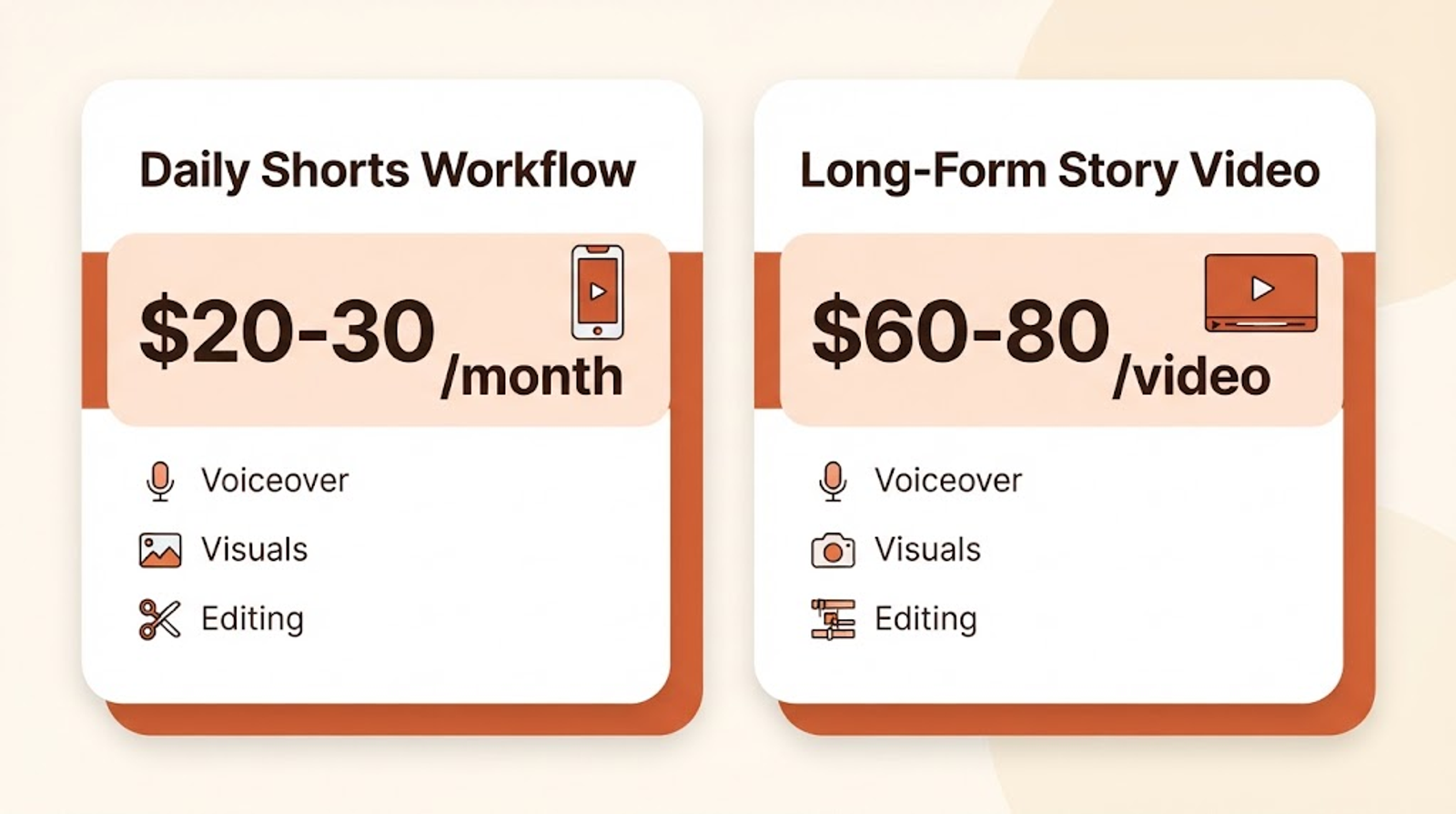
The gap between those two numbers is the format, not the tools. A single 8–10 minute story video needs far more generated footage than a 20-second Short, so the per-video cost scales with runtime almost linearly.
One-Click Tools vs. Piece-by-Piece: What Actually Works
This is genuinely split opinion among the creators discussing it — not a case where one side is clearly right.
The case for one-click/all-in-one tools (InVideo AI, Pictory, HeyGen): faster to start, lower learning curve, good for testing whether you even enjoy making faceless content before you invest real time. Several beginners specifically recommend starting here, then "graduating" to a manual pipeline once you know your format works.
The case for building it yourself, tool by tool: multiple experienced Reddit creators were blunt that one-prompt, all-in-one tools were "terrible" for anything requiring real creative control, and that a manual pipeline — a dedicated image generator, a separate animation tool, a separate voice tool — gets easier and faster every time you use it once you've built the workflow once. One creator's specific stack: a still-image model (Flux/Hidream via a wrapper tool) for visuals, a separate animation tool to bring those stills to life, and Suno for music.
The practical middle ground several commenters landed on: if you already know how to edit (CapCut, Premiere, etc.), skip the all-in-one platforms and just buy the visual-generation and voice pieces separately — you'll likely spend less and get more control. If editing itself is the unfamiliar part, an all-in-one tool with built-in editing (like InVideo AI or CapCut's own AI features) removes that barrier while you learn.
Common Mistakes Beginners Make
- Starting with pure text-to-video instead of image-to-video. You'll burn credits re-rolling clips to fix distorted faces, hands, or objects. Generate a clean still first, then animate it.
- Buying an expensive all-in-one subscription before testing whether you enjoy the format at all. CapCut's free/low-cost tier or Canva's free tier can validate the idea first.
- Chasing the "prettiest" clip instead of the most consistently usable one. As one Reddit creator put it, the tool that matters is the one where you can generate enough usable clips without destroying your credits on every retry — not the one with the single best demo reel.
- Picking an oversaturated, generic niche. Because the barrier to entry for AI video is close to zero, extremely broad topics like "top 10 travel destinations" or generic motivational content are flooded with near-identical videos. Demand hasn't grown anywhere near as fast as the supply of that kind of content has.
- Skipping the voiceover. Multiple sources across this research flagged narration as a meaningful factor in both watch time and monetization eligibility for faceless content — a silent slideshow reads as lower effort to both viewers and, per several creators, to YouTube's own review process.
Which Niche Should You Actually Pick?
"Viral YouTube niches for 2026" is one of the most-searched questions around this topic, and there's no single universal answer — but the research does point to a pattern worth paying attention to: specificity beats breadth.
One Quora contributor pointed to a real example worth understanding, not necessarily copying directly: a channel focused narrowly on food history — specifically, telling the origin story of a single ingredient as a mini-documentary — reportedly grew to around 31,000 subscribers and close to 3 million total views within about four months of launch, across 55 videos. That's roughly 54,000 average views per video, according to the same source. We haven't independently verified those figures ourselves, so treat the specific numbers as one person's reported claim rather than confirmed data — but the underlying pattern (a narrow, specific angle on a broad topic like "food," rather than "top 10 foods" generic content) lines up with what multiple sources in this research say about avoiding saturation.
The broader point several sources agreed on: an "AI slop" strategy — mass-producing generic videos in bulk with no distinct angle — is increasingly easy to spot and increasingly hard to grow with, because everyone with access to the same tools can produce the same generic output.
Do You Need to Show Your Face or Voice to Monetize?
Showing your face is not required for YouTube Partner Program eligibility — the standard threshold is 1,000 subscribers and 4,000 public watch hours in the past 12 months, or 10 million Shorts views in the past 90 days, with no on-camera requirement attached to either path. Faceless channels have hit that bar for years; Kurzgesagt and Bright Side are two well-known, long-running examples that never show a human presenter.
Voice or narration is a separate, practical question rather than a hard monetization rule. Several creators in our research specifically flagged that videos with no voiceover at all — a pure image slideshow with background music — tend to read as lower-effort content, both to viewers and in YouTube's review process for reused/repetitive content, which is a real risk factor distinct from the subscriber/watch-hour threshold above. If your format allows it, adding narration (your own voice, a clone of it via a tool like ElevenLabs, or a scripted AI avatar via HeyGen) is worth the extra step.
Always confirm current numbers against YouTube's own Partner Program page before you plan around them — thresholds and policy details do get revised.
Key Takeaways
- No single AI video generator wins for every faceless channel — the right pick depends on video length, budget, and how much manual control you want.
- Image-to-video generally wastes fewer credits than pure text-to-video, because you're not rerolling full clips to fix distortion.
- Real creator-reported costs range from roughly $20–30/month for a daily-Shorts workflow up to $60–80 per video for longer, high-mid quality narrative content.
- All-in-one tools are faster to start with; a manual multi-tool pipeline generally gives more control and can cost less once you've built the workflow.
- Niche saturation is real — narrow, specific angles on a topic tend to outperform generic, broad content in a market flooded with AI-generated videos.
- Adding real narration matters for both audience retention and how your content is likely to be reviewed for monetization — a silent slideshow is the weakest version of this format.
Final Thoughts
Every tool on this list can produce a usable faceless video. The bigger variable is your own workflow discipline — testing 2–3 tools against the same script before committing a monthly budget to any one of them, tracking your actual cost per finished video, and picking a niche specific enough to stand out in a market where the barrier to entry keeps dropping. Start cheap, figure out which part of the process you actually enjoy, then invest further once you know your format works.
Frequently Asked Questions
Which AI is best for faceless YouTube videos?+
There's no single best tool — it depends on format. InVideo AI suits beginners wanting an all-in-one workflow; Kling AI suits daily Shorts creators watching their budget; HeyGen suits presenter-style/educational content.
Is there a 100% free AI video generator?+
Canva's free tier with Magic Media is the closest option on this list to genuinely free, though output quality and consistency generally trail paid, dedicated video-generation tools. Most other tools listed here offer limited free trials rather than an ongoing free tier.
Can ChatGPT generate video?+
Not natively as of this writing — ChatGPT is a text and image tool. Creators commonly use ChatGPT (or Claude) to write scripts, then feed that script into a separate video-generation tool like the ones covered above.
How much does it cost to make a faceless YouTube video with AI?+
Based on figures shared by creators in our research, a short-form video (15–30 seconds) can run roughly $20–30/month across a full tool stack at daily-upload volume, while a longer 8–10 minute narrative video can run $60–80 in generation costs alone per video, before other tools.
Do I need to stitch together multiple tools, or is there an all-in-one option?+
Both approaches exist and both work. All-in-one tools (InVideo AI, Pictory, HeyGen) trade some creative control for speed and simplicity. A manual pipeline (separate image, animation, and voice tools) generally gives more control and, according to several experienced creators, often costs less once you've built the workflow — at the cost of a steeper learning curve.
Which faceless content niche performs best in 2026?+
There's no universally "best" niche, but narrow, specific angles on broad topics (like a documentary series on one ingredient's history, rather than generic "top 10" lists) appear to outperform oversaturated, generic content — based on patterns reported by creators in our research, not a guarantee for any individual channel.
Do faceless YouTube channels get flagged or demonetized for being AI-generated?+
YouTube's policies target low-effort, reused, or repetitive content specifically — not AI use itself. Several sources in our research note that YouTube has increased scrutiny on obviously mass-produced "AI slop," which reinforces the case for adding a distinct angle, real narration, and original framing rather than generic, templated output.
Keep reading
Suggested Related Articles
GPT-6 Sol vs Luna: What OpenAI's Pricing Table Actually Means
GPT-6 Sol and Luna launched September 2026 with a pricing table that confused much of Reddit on day one. Here's the real cost breakdown, the naming trap versus GPT-5.6, and which model actually fits your work.

How to Automate Product Video From Your Ecommerce Catalog With AI
AI product video automation actually works two different ways — generative AI and template-based pipelines. Here's the full workflow, which tools fit which job, and what goes wrong once you scale past a handful of products.
How to Use ChatGPT Images 2.5 for AI Photo Editing
The prompt structure that makes ChatGPT Images 2.5 editing work, plus Sketch, comments, templates, Flare vs Sunburst, pricing, and the real limits.
How to Create 1980s-Style AI Images From Your Photos
The exact four-part prompt formula for a convincing 1980s AI photo — plus why faces distort, real privacy trade-offs, and the backlash nobody else is covering.