The Mother's Monster: How a Pakistani Creator's AI Film Hit 50M Views, and 10 AI Movie Generators to Make Your Own
The Mother's Monster, a 28-minute AI film by Pakistani creator Zahid Iqbal, drew 50M+ views by the studio's count. This guide separates what's confirmed from what isn't, shows what a similar film could cost, and compares 10 AI movie generators to try.

Umer Khan has spent the last two years building and testing AI-assisted content workflows for YouTube, from scripting to 2D animation. He writes about what actually works in AI video production including the parts that don't.
Quick answer: The Mother's Monster is a 28-minute AI-generated dark-fantasy film by Pakistani creator Zahid Iqbal, about a mother who gives birth to a dragon. His studio ZetoMate says it drew 50 million-plus views in seven days, cost under $2,000 in direct tool spend, and took under 72 hours from locked screenplay to final picture. The makers have not disclosed which AI models or editing tools they used, so nobody outside the team can honestly say how it was built. You can still make a film in the same spirit with the 10 tools below, but you'd be recreating the approach, not the exact recipe.
If you came here hoping for a confirmed tool list, that's the one thing no source can give you. What follows is everything that is known, a clear line around what isn't, and a practical way to start.
1. What Is The Mother's Monster?
Direct answer: It's a 28-minute-29-second dark-fantasy short film, also titled "She Gave Birth to a Dragon," written and directed by Zahid Iqbal and published on a YouTube channel called MYTHRA.
The story is simple. In a frozen mountain village, a woman gives birth to a dragon. The villagers see a monster to be destroyed, and she sees her son.
Press coverage describes it as an AI-made film that spread from YouTube to TikTok and other platforms, helped along by clips and reaction videos. Zahid Iqbal is from Layyan, per Pakistani outlet INP, and runs ZetoMate, an AI-focused cinema studio. One reviewer argued the technology felt secondary to the emotion: a mother protecting her child.
2. What's Confirmed, Claimed, and Undisclosed
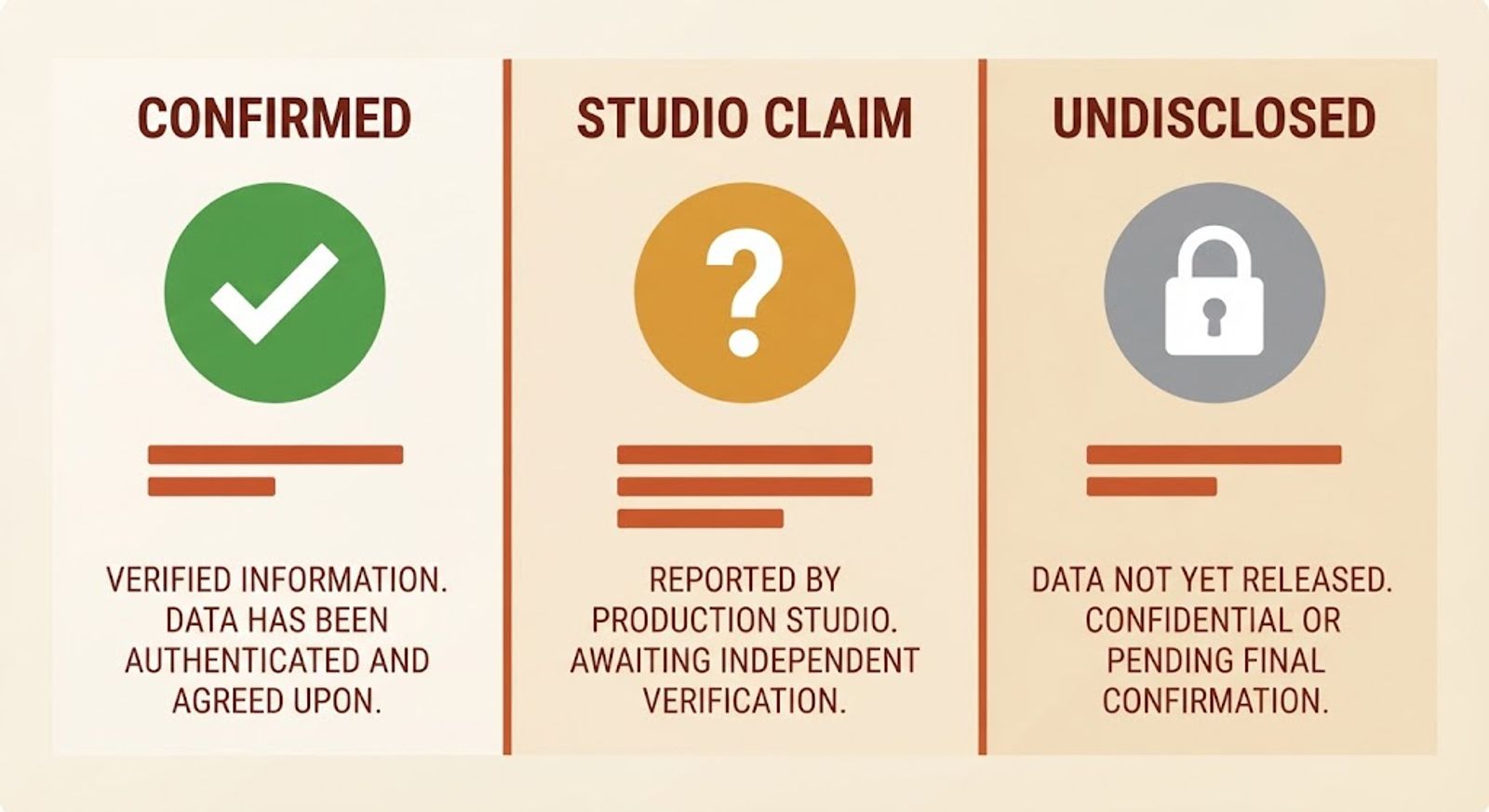
Direct answer: The AI use is disclosed. Almost everything about the numbers is the studio's own claim, and the exact tools are not disclosed at all.
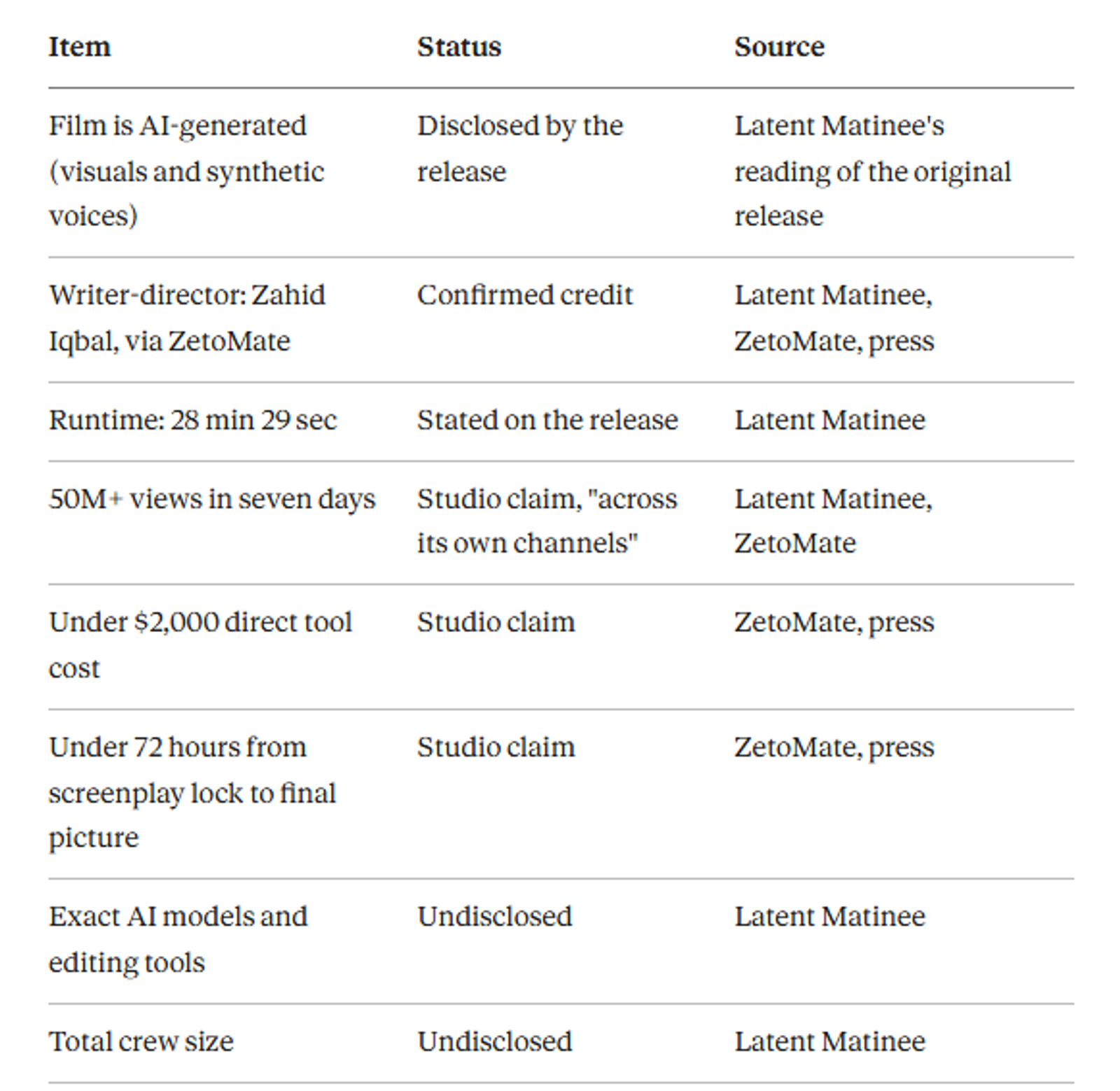
A separate recreation guide from SolutionHow states plainly that public sources describe the film's story and tiny budget but don't name its tools. It says so before offering its own Higgsfield recipe, which is the honest way to frame it.
3. Why the Numbers Don't Fully Agree
Direct answer: Because different outlets count different things: one channel, many channels, or multiple platforms.
- Views: ZetoMate says 50M+ across its channels in seven days. Latent Matinee flags that this is a studio claim covering a different scope from a single full-film counter. Daily Beirut reported more than 53 million YouTube views in about two weeks. A Facebook page tied to the film's collective advertises "1B+ views," a figure I couldn't verify and wouldn't repeat as fact.
- Cost: The studio's claim is under $2,000 in direct tool cost. A Medium review says a Pakistani creator spent "a few hundred dollars." Both can't be true as stated. Latent Matinee notes the $2,000 figure excludes total labor and the development period.
- Time: "Under 72 hours" is measured from a locked screenplay to the final picture. It doesn't include writing the script, designing the story, or building the audience that watched it.
None of this means the film isn't a real success. It means the headline numbers are best read as the studio's own scoreboard.
4. Can You Make a Film Like It? The Workflow
Direct answer: Yes, the broad approach is repeatable: lock a short story, design your characters as reference images, generate shots, add voices, and edit. The speed and the views are not guaranteed by any tool.
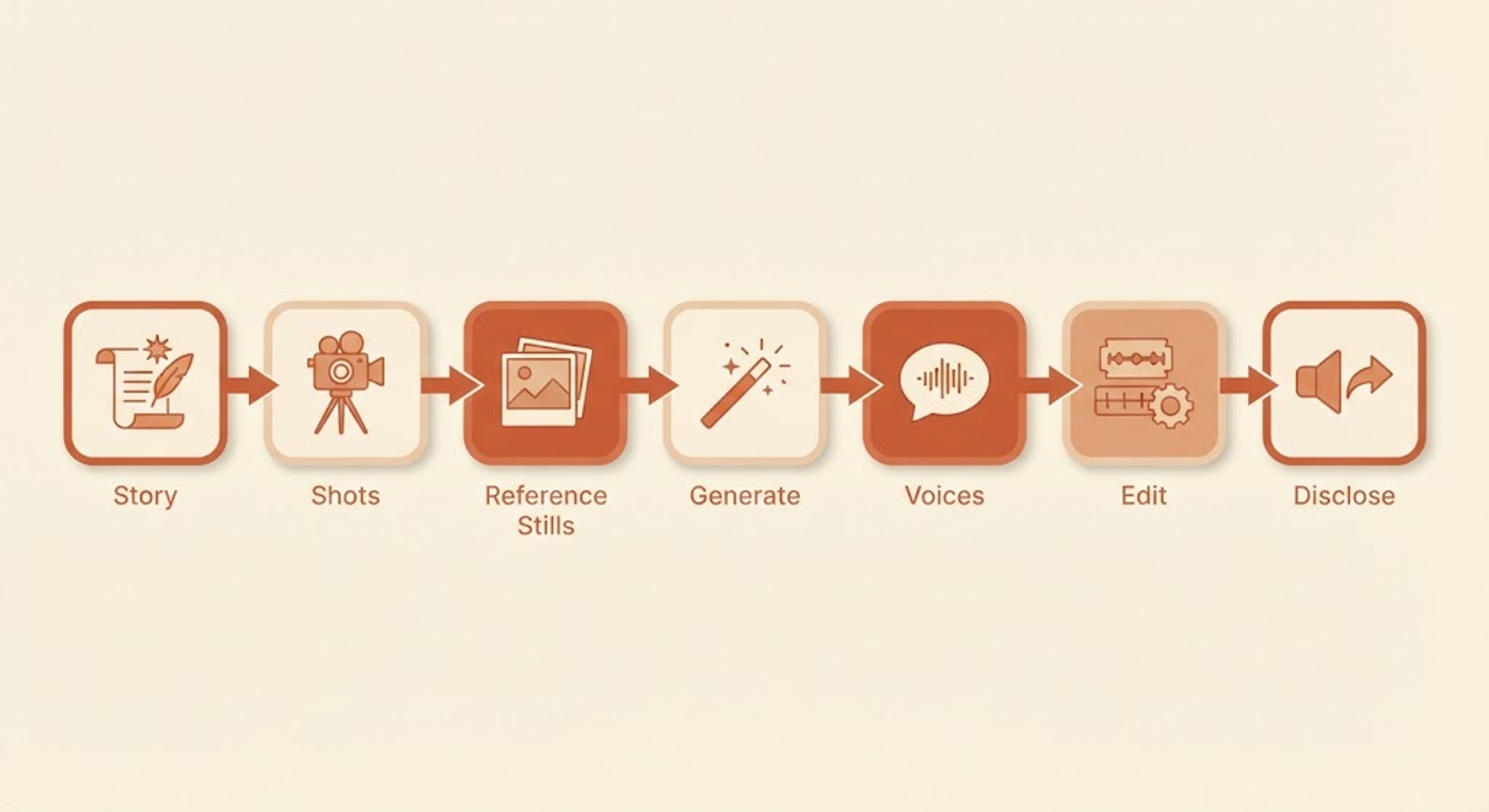
Step 1: Write one clear emotional conflict. Latent Matinee singles out the film's "I see my son" versus "we see a monster" conflict as its foundation. A story that explains itself in one sentence is easier to shoot shot-by-shot.
Step 2: Lock the screenplay and break it into shots. Aim for short shots. Most models hold a subject steadily for only seconds at a time, and the same limits we covered in why AI character consistency is still broken apply to films.
Step 3: Design each character and creature as a still image first. Invideo's guidance on cinematic creatures is to lock the creature's design as a reference still before animating it. Do the same for the dragon and the mother.
Step 4: Generate shots from those references. Use image-to-video with your reference stills, and generate several versions of key shots.
Step 5: Add voices and sound. The film disclosed synthetic voices. Use a voice tool, then edit pacing by hand so the performances don't sound flat.
Step 6: Edit, grade, and mix. One long-form guide recommends finishing in a proper editor such as DaVinci Resolve, because a film has to survive the final edit, grade, mix, and export.
Step 7: Disclose the AI use when you publish. YouTube requires disclosure for realistic synthetic content, and our guide to monetizing AI videos on YouTube covers what that means.
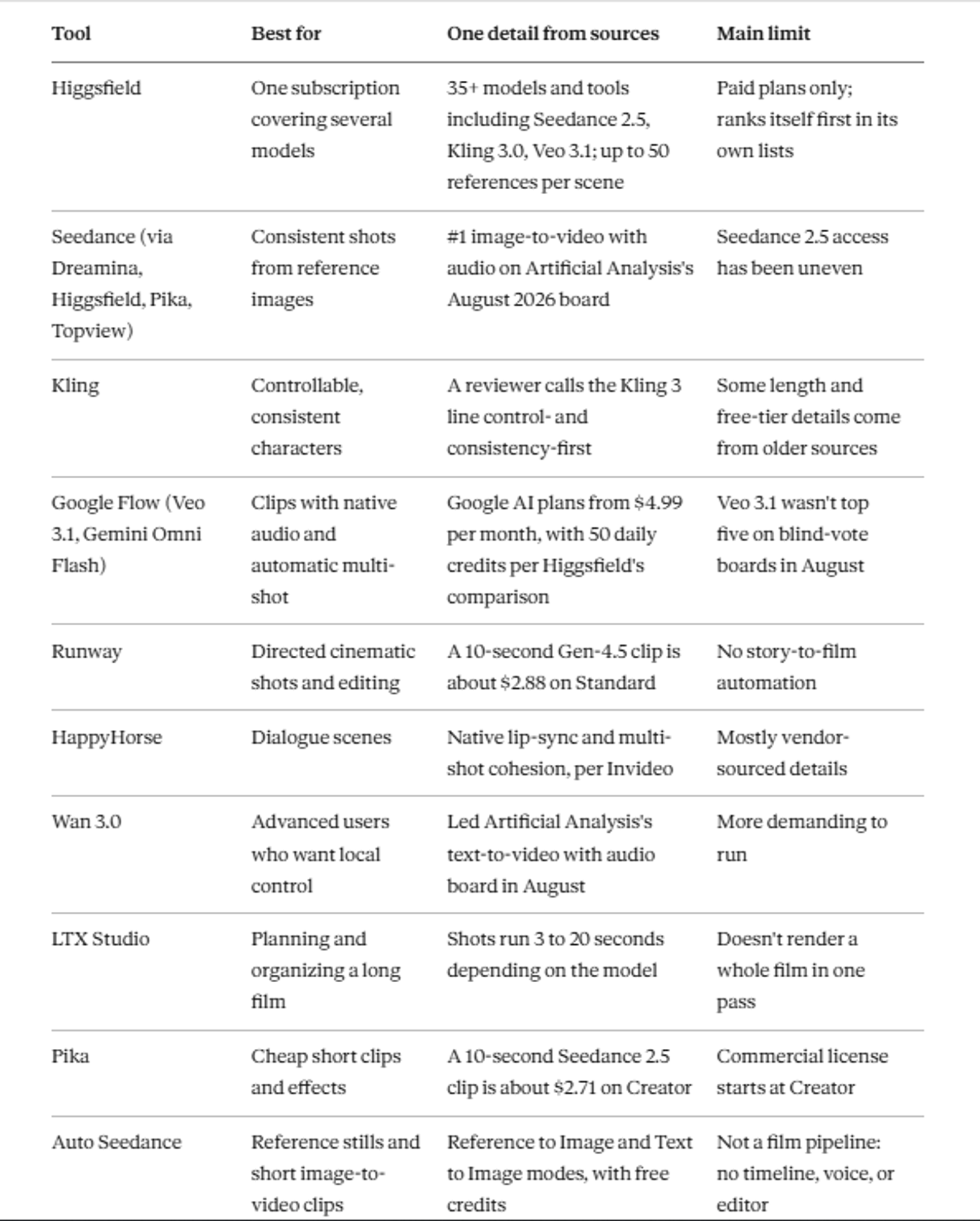
5. 10 AI Movie Generators at a Glance
Direct answer: There's no single best AI movie generator. A film usually needs a generation tool, a consistency method, a voice tool, and an editor.
These are grouped by job, not ranked, and several rank themselves first in their own lists, so I note the source of each claim.
6. The 10 Tools in More Detail
1. Higgsfield
Higgsfield is a multi-model suite. Its own comparison page lists more than 35 models and tools, including Seedance 2.5, Kling 3.0, Veo 3.1, Wan 3.0, Cinema Studio 4.0, and HappyHorse. An independent long-film guide says it can carry up to 50 references plus an AI cast and a project brief into scene generation.
Pros: many models in one plan; character tools. Cons: paid plans only, and plan prices differ across its own pages (Starter appears as $15 on one page and $19 on another). Who it's for: people who want one account instead of five.
2. Seedance (2.0 and 2.5)
ByteDance's Seedance 2.0 led the image-to-video-with-audio category on Artificial Analysis's blind-vote board in August, as we covered in our real AI video leaderboard. Seedance 2.5 adds longer single shots and more references, with a rollout that was still settling, as our Seedance 2.5 guide explains. A reviewer on Synthesia's list calls 2.5 the most cinematic output but hard to access.
Pros: strong shot-to-shot consistency. Cons: access and pricing differ by platform. Who it's for: anyone building scenes from reference images.
3. Kling
One reviewer's verdict is that Kling prioritizes control, consistency, and usability over raw randomness, which suits a project you plan to build on. An older source describes clip extension up to three minutes and reference-image "Elements," and a few guides mention a free daily allowance. Check current limits before planning around any of that.
Pros: predictable results. Cons: older details may be out of date. Who it's for: people who want control over repeating characters.
4. Google Flow (Veo 3.1 and Gemini Omni Flash)
Flow is Google's filmmaking app. Veo 3.1 comes in Lite, Fast, and Quality tiers, and Gemini Omni Flash sits alongside it. Reviewers consistently credit Veo with strong audio integration, and one list calls Gemini Omni Flash the best filmmaking tool for automatic multi-shot generation.
Pros: audio included; low entry price. Cons: Veo 3.1 trailed several models on blind-vote boards. Who it's for: people who want sound built into each clip.
5. Runway
Runway's Gen-4.5 generates clips, and Aleph 2.0 edits existing video. On the Standard plan ($15 per month for 625 credits), a 10-second Gen-4.5 clip costs 120 credits, about $2.88, and monthly credits don't roll over on Standard or Pro. It was built around "world consistency," holding a character from a reference image across scenes.
Pros: precise control and editing. Cons: you do the assembly. Who it's for: directors who want shot-level control.
6. HappyHorse
HappyHorse appeared in the top five on several Artificial Analysis boards in August. Invideo describes native lip-sync and cohesion across multi-shot sequences, with consistent characters and wardrobe. That claim comes from a vendor guide, so test it on your own footage.
Pros: dialogue focus. Cons: thin independent documentation. Who it's for: talking scenes.
7. Wan 3.0
Wan led Artificial Analysis's text-to-video-with-audio board in August. Invideo says it's more demanding but gives advanced users deeper local control over consistency than cloud tools do. Reports about its licensing and access have conflicted, so check the current terms.
Pros: control. Cons: setup effort. Who it's for: technical creators.
8. LTX Studio
LTX Studio is for planning and organizing, not rendering a whole film at once. A long-film guide from August calls it the best starting point because shots run 3 to 20 seconds and the project stays legible. That's the same limit every tool here shares.
Pros: structure for long projects. Cons: still shot-by-shot. Who it's for: anyone planning more than a few minutes.
9. Pika
Pika bundles video apps and models, including Seedance 2.5. On the Creator plan ($35 per month for 3,150 credits), a 10-second Seedance 2.5 clip at 720p is about $2.71, according to Higgsfield's pricing comparison. The commercial license starts at Creator, so a Starter plan doesn't cover published work.
Pros: cheap clips. Cons: clips need editing into scenes. Who it's for: trailer beats and effects.
10. Auto Seedance
Full disclosure: this is our own tool. Auto Seedance generates images and short videos from Seedream and Seedance models, with Text to Image and Reference to Image modes. It fits the early stages of a film, such as creating character and creature reference stills, but it isn't a film pipeline.
Pros: reference-based stills and clips with free credits. Cons: no timeline, voice tools, or editor. Who it's for: building the reference stills a longer film starts from.
Recommended For You:
7. What a 28-Minute AI Film Could Cost
Direct answer: At public clip prices, the generation alone for 28 minutes of footage lands between roughly $450 and $900 if every shot works first try, and the studio's under-$2,000 figure is plausible only with a handful of retakes per shot.
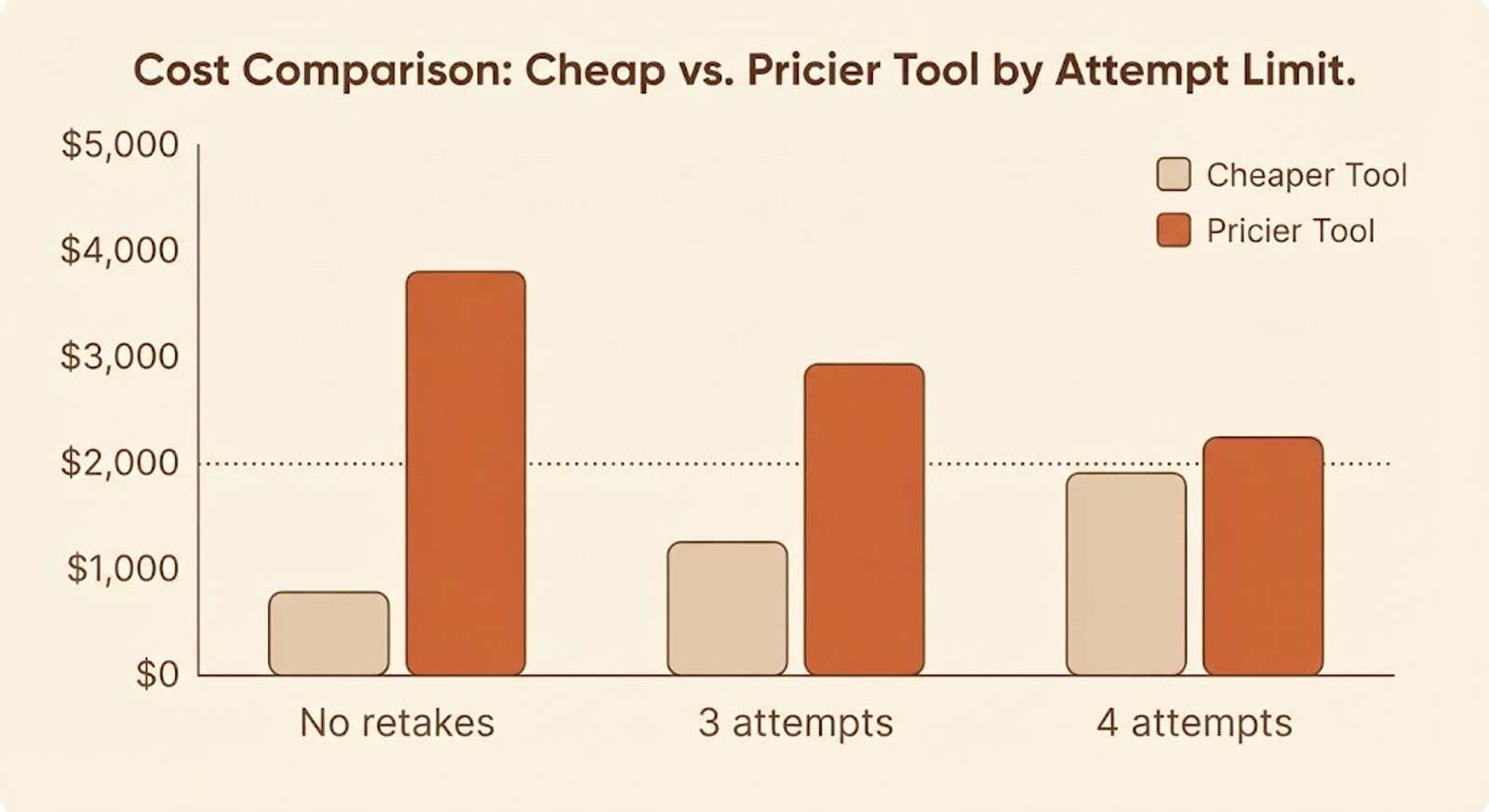
This is my own arithmetic from the prices above, not how ZetoMate built the film. Twenty-eight minutes is about 1,680 seconds of footage.
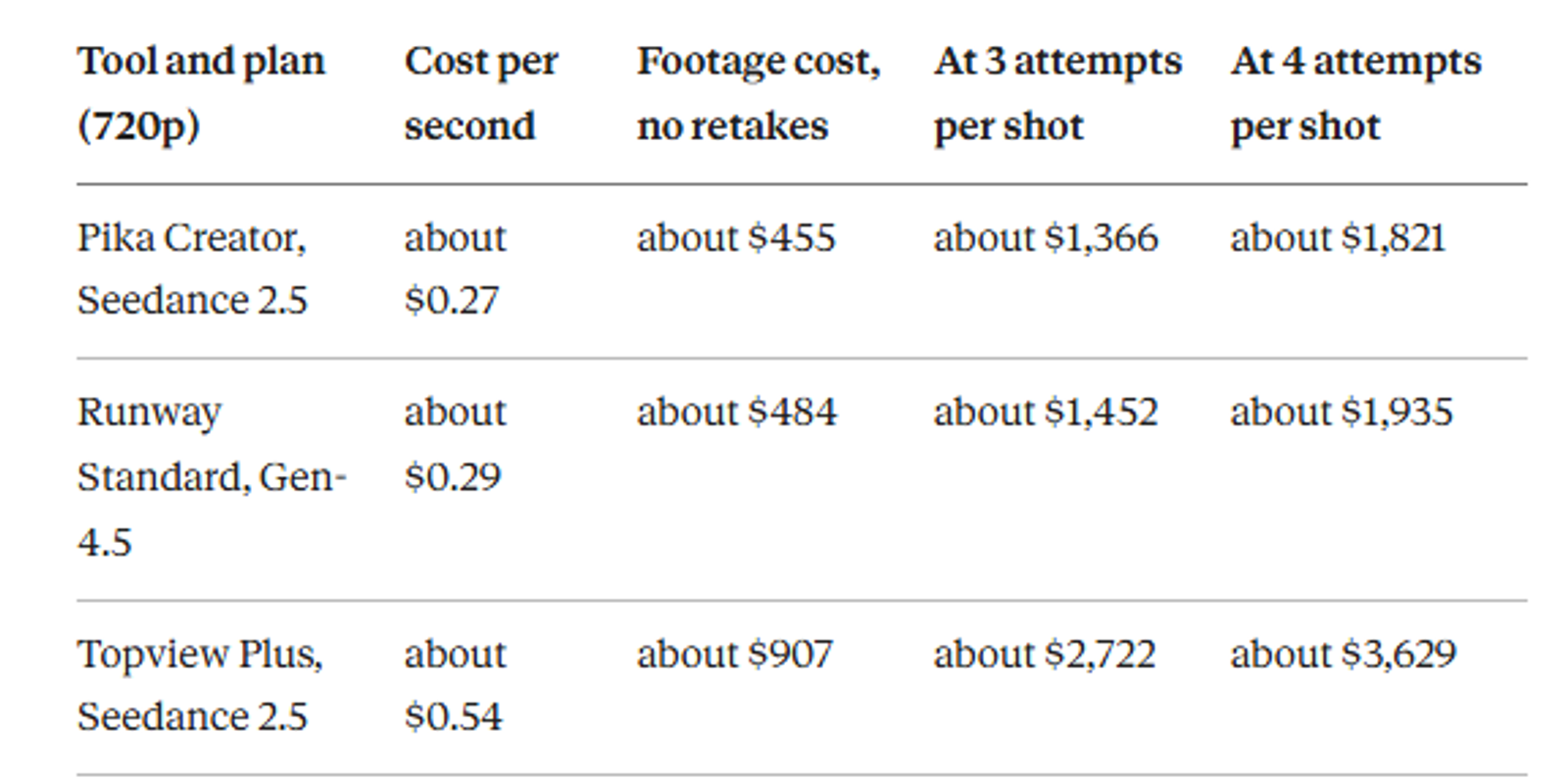
So "under $2,000" can be true on the cheaper tools at three to four attempts per shot, but not on the pricier one. Voice, music, upscaling, and the person-hours are extra. That's consistent with Latent Matinee's note that the stated cost excludes labor.
8. What Tools Can't Copy
Direct answer: A tool gives you footage. It doesn't give you a story people care about, an audience, or a distribution plan.
Reviewers who praised the film pointed to the story, not the technology: the "mother versus village" conflict was legible in seconds. ZetoMate also sells brand production services, so the film doubles as a showcase for the studio, which is worth keeping in mind when reading its numbers. And ZetoMate says it built its approach from years of testing what holds audiences, which I couldn't verify independently.
Arab critics quoted by Daily Beirut also split on what such films mean for cinema. One argued an AI-made star won't walk the streets or marry, and audiences won't feel the same about one, while a screenwriter said AI is already changing how scripts are drafted. Both points are fair.
9. Where Auto Seedance Fits
Auto Seedance isn't trying to be a one-click movie generator, and it would be misleading to say otherwise. Where it helps is the first, most repeatable part of the workflow in Section 4: producing reference images of your characters and creature, then animating short clips from them.
You'd still need a voice tool, an editor, and a way to keep scenes consistent across a long cut. If you're new to AI film, a smaller first project is a better test than a 28-minute epic. Our guide to making a faceless AI reel from one photo shows the same photo-to-motion workflow at a much smaller scale.
Final Thoughts
The Mother's Monster proves that one person with AI tools and a clear story can reach a huge audience. It doesn't prove that any particular tool is the secret, because the makers haven't said which tools they used.
Start smaller than 28 minutes. Pick a story that fits in one sentence, design your characters as stills first, and keep your first film short enough to finish.
Frequently Asked Questions
Was The Mother's Monster made with AI?+
Yes. The release discloses generated visuals and synthetic voices, according to Latent Matinee's reading of the original YouTube release.
Which AI tools were used to make The Mother's Monster?+
That hasn't been disclosed. Latent Matinee says the exact models, editing tools, and crew size are undisclosed, and other guides say the same. Any list claiming to know is guessing.
Who made The Mother's Monster?+
Zahid Iqbal, a Pakistani creator who wrote and directed it and runs ZetoMate, an AI-focused studio.
How much did it cost?+
ZetoMate claims under $2,000 in direct tool cost. A Medium review says a few hundred dollars. The studio's figure excludes labor and development time.
How many views did it get?+
The studio claims 50 million-plus across its channels in seven days, and Daily Beirut reported 53 million-plus YouTube views in about two weeks. These counts cover different scopes.
Can I make an AI movie for free?+
Partly. Some tools offer free daily credits or trial credits, but a long film needs far more generation than free tiers usually allow. Check each tool's current limits and commercial-use terms.
Which is the best AI movie generator?+
It depends on the job: Seedance or Kling for consistent shots, Flow for built-in audio, Runway for directed shots, and LTX Studio for planning. Rankings change often, so recheck current leaderboards.
Do I have to disclose that my film is AI-made?+
On YouTube, realistic synthetic content has to be disclosed when you upload. Properly disclosed AI content can still be monetized, as covered in our guide on AI video monetization.
Keep reading
Suggested Related Articles
How to Add Auto AI Captions to Video Free (Step-by-Step Guide)
Learn how to add auto AI captions to your video for free. Follow simple steps, fix common caption mistakes, and compare free tools like Auto Seedance, CapCut and YouTube.
How to Master AI Filmmaking: A Tool-Agnostic Workflow With Real Costs and Limits
Making one AI clip is easy; making a film is a different skill. This guide covers the tool-agnostic workflow, a first-scene exercise, where it breaks, and what a 10-second scene, a minute, and five minutes cost at current public prices.

GPT-6 Astra in ChatGPT: Who Actually Gets It, and What Free Users Get Instead
GPT-6 Astra is OpenAI's flagship, but most ChatGPT users run Sol or Luna. This guide explains who gets Astra on each plan, how to find it, what it costs, where OpenAI's own benchmark table shows it trailing, and why older guides are out of date.
Claude Startups Program After the Pause: What's Still Free, What Changed, and How to Apply
Anthropic expanded the Claude Startups program on October 6, then paused its free Team year and $1,000 API credit days later. This guide covers what's still available, who qualifies, what the dollar figures mean, and how to apply, with every claim sourced.