How to Master AI Filmmaking: A Tool-Agnostic Workflow With Real Costs and Limits
Making one AI clip is easy; making a film is a different skill. This guide covers the tool-agnostic workflow, a first-scene exercise, where it breaks, and what a 10-second scene, a minute, and five minutes cost at current public prices.

Umer Khan has spent the last two years building and testing AI-assisted content workflows for YouTube, from scripting to 2D animation. He writes about what actually works in AI video production including the parts that don't.
Quick answer: To master AI filmmaking, plan the story and the shots first, create reference images of your character and location, then generate every shot from those references so the look stays consistent. Write a time-coded, multishot prompt with one camera move per shot, generate several versions, and fix problems in the finished clip instead of regenerating it. Assemble scenes in an editor, and budget before you start: at current public prices, footage costs roughly $3 to $8 per 10 seconds before retakes.
Anyone can make one striking clip now. A film asks for something else: the same face, the same place, and a story that survives the cut from shot to shot.
That's the skill gap this guide covers.
1. What Is AI Filmmaking?
Direct answer: AI filmmaking is making a film where AI generates the images, shots, and often the sound, while you decide the story, the look, and the order of shots.
The word that matters is "decide." The tools produce footage, but nothing in them writes a good scene or chooses what to cut. That's why viral examples such as The Mother's Monster depend on a story people can follow, not only on the generator behind it.
2. How Does an AI Film Get Made?
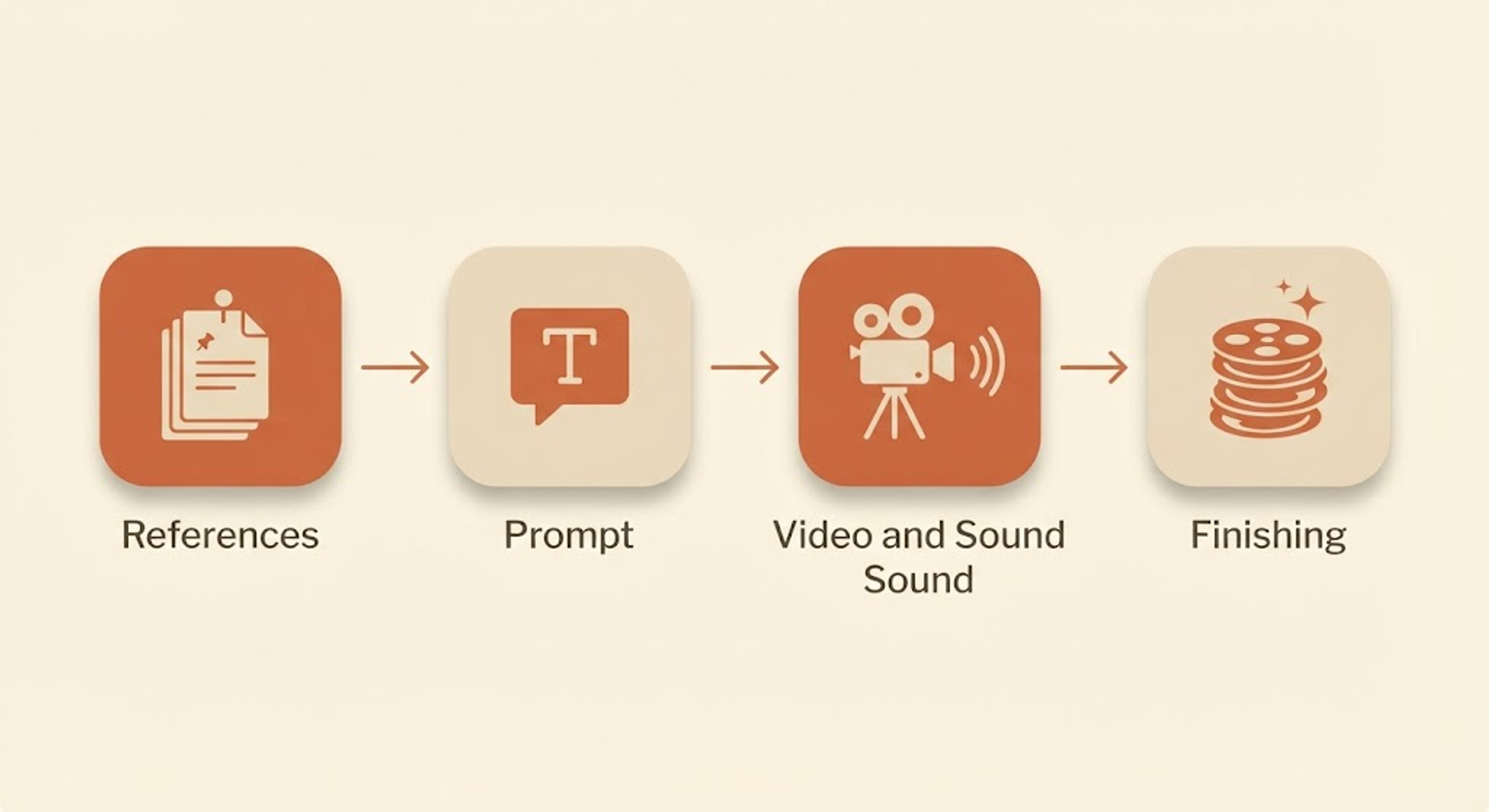
Direct answer: Four stages, in order: reference images, a shot-by-shot prompt, video with sound, and finishing.
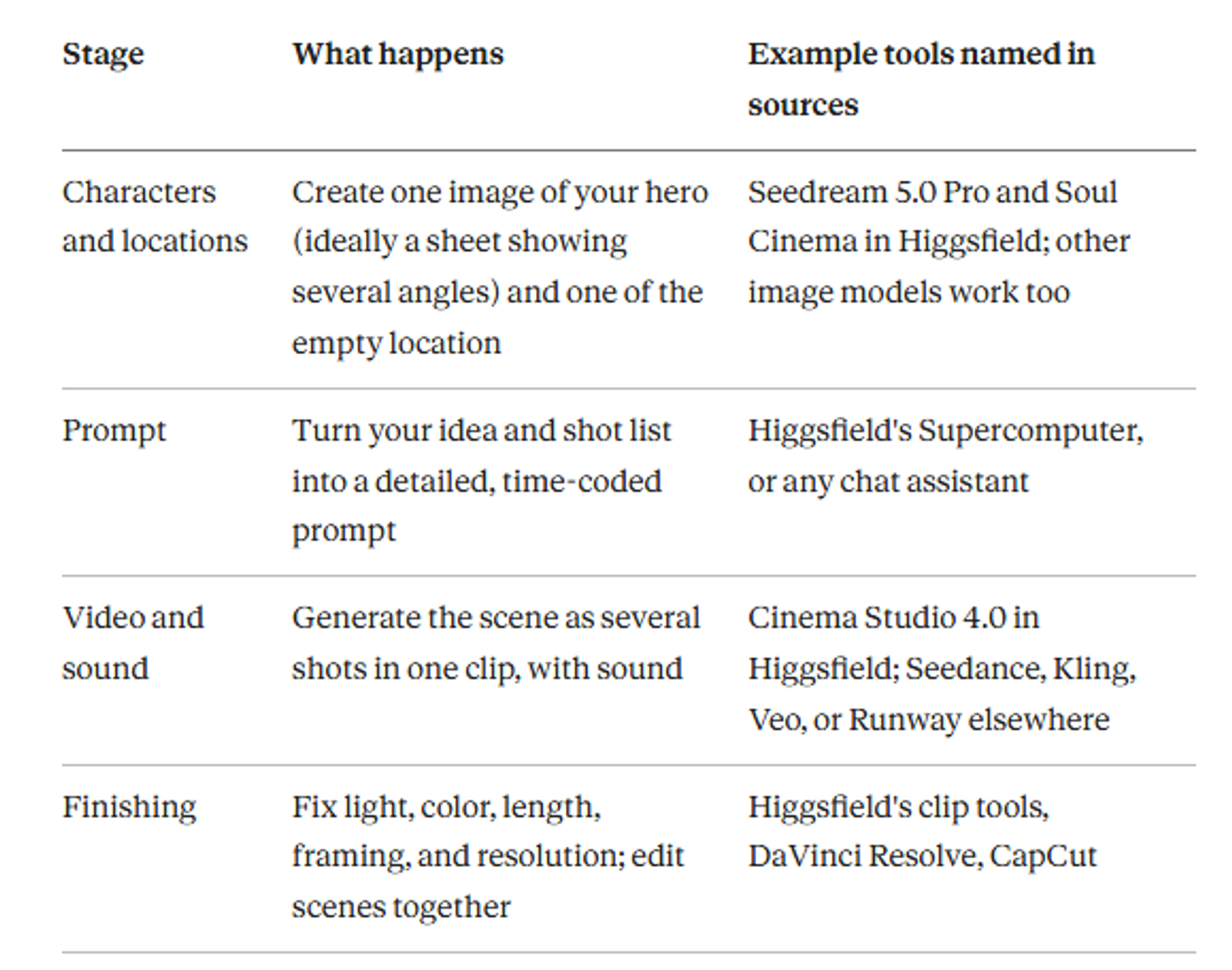
Pick tools by what has to stay constant. If one character appears in several shots, start with images, because they become the references for every shot. If you're only testing an idea, a text prompt alone is enough.
3. Your First Scene, Step by Step
Step 1: Write the scene in one sentence. Example: a night-market vendor packs up as rain begins, then sits under his awning and watches the street empty.
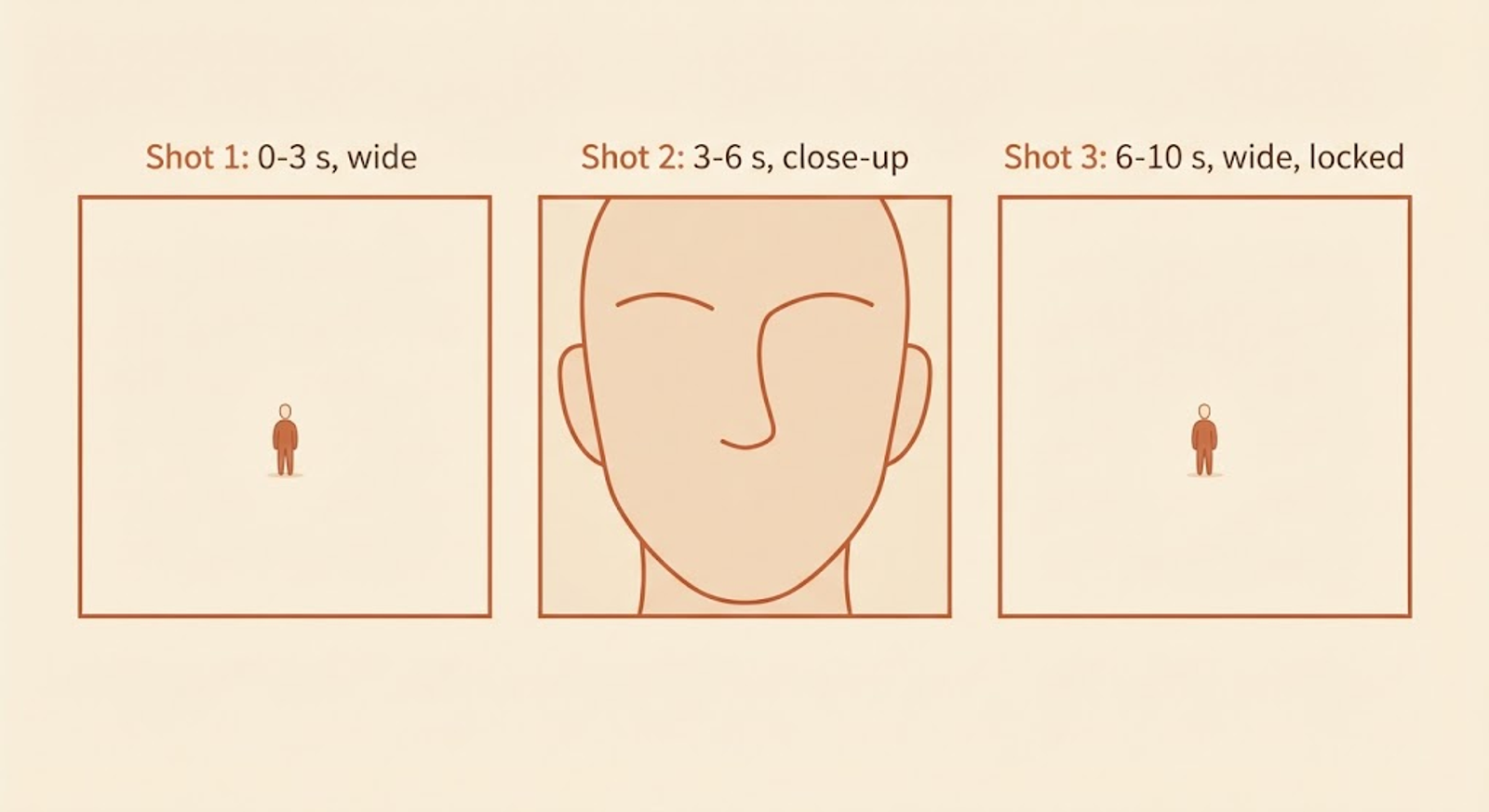
Step 2: Split it into three shots. A wide establishing shot, a close-up, and a wide ending shot is enough for 10 seconds. Fewer shots mean fewer chances for the look to drift.
Step 3: Create your character reference. Generate one image that shows the same person from several angles. Keep the outfit simple, since every extra detail is one more thing that can change between shots.
Step 4: Create your location reference. Make one image of the empty place. If you can't describe the layout well, draw it: our guide to ChatGPT's Sketch feature explains how a rough drawing can pin down a layout.
Step 5: Write a time-coded prompt. Give each shot its own time range, action, and one camera move. Add light, sound, and style at the end.
Step 6: Generate several versions. Run a few at once and compare. Each completed version is billed, so decide how many you can afford before you press the button.
Step 7: Fix instead of regenerating. Use relight, color, trim, extend, and reframe tools on the finished clip where your tool has them.
Step 8: Assemble and publish. Put scenes together in an editor, grade for consistency, and disclose AI use when you upload. Our guide to monetizing AI videos on YouTube covers disclosure.
A Compact Prompt Template
This is my own short template built on the structure Higgsfield describes. Tag your references the way your tool expects, since the syntax differs between tools.
SCENE: [one sentence]. REFERENCES: [character] and [location]. Outfit, hair, and light stay identical in every shot. SHOT 1 (0-3 s), wide: [action]. Camera: [one slow move]. SHOT 2 (3-6 s), close-up: [action]. Camera: handheld. SHOT 3 (6-10 s), wide: [action]. Camera: locked off. LIGHT: [source and color]. SOUND: [ambience and effects, no dialogue]. STYLE: [film look]. AVOID: extra people, on-screen text.
Wrong Prompt vs Right Prompt
❌ Wrong:
"A sad girl at a train station, cinematic, 4K."
It gives the model no shots, no camera plan, no reference, and no sound, so every generation reinvents the scene.
✅ Right:
"Three-shot scene, 10 seconds. Girl from the reference sheet waits on the seaside platform at blue hour. Shot 1, 0-3 s: wide, slow dolly in. Shot 2, 3-6 s: close-up, headlight glow crossing her face. Shot 3, 6-10 s: locked-off wide, she boards and the train leaves. Same outfit and light in all shots. Sound: waves, wind, wheels, no dialogue."
4. What Makes the Workflow Work
- References do the heavy lifting. Adding the same character and location images to every shot is Higgsfield's main fix for drifting faces and settings.
- Multishot generation keeps shots connected. Generating several shots in one clip helps keep the look aligned, compared with generating each shot separately.
- Sound comes with the picture. In Higgsfield's tool, switching sound on generates audio together with video, which you shape by describing what we should hear.
- Fixes don't need a full redo. Relight, color-palette edits, trim, extend, reframe, and upscale work on a finished clip.
- Short shots stay stable. The same coherence window we found in our food-video workflow applies here: smaller units drift less.
5. Where It Breaks
Direct answer: The common failures are a changing face, a changing location, camera drift, confused action, and scenes that don't match each other.
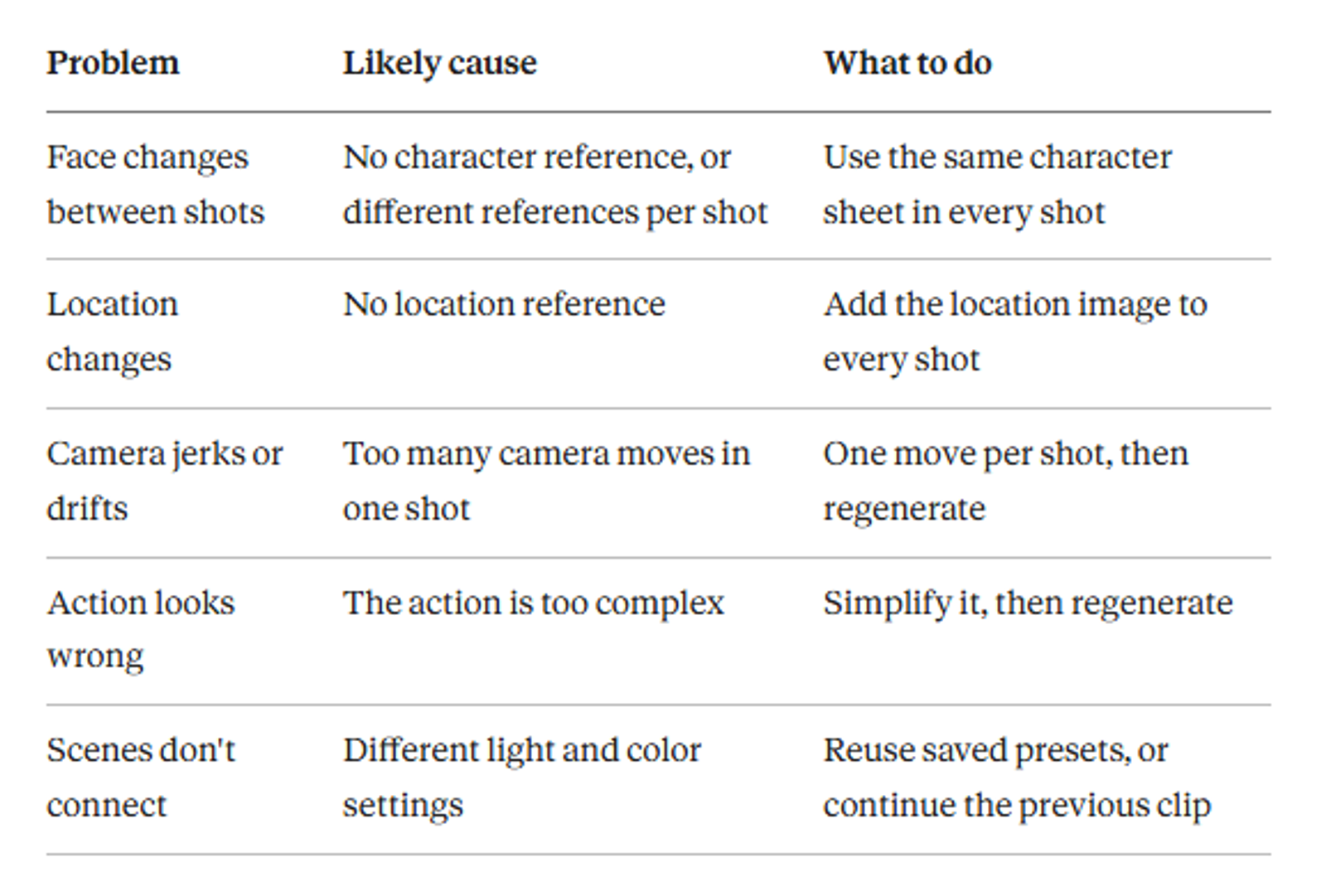
The first row is the problem we covered in why AI character consistency is still broken, and references reduce it without removing it. Two more limits worth knowing: Higgsfield says one generation can run up to 30 seconds, so anything longer needs several clips joined in an editor, and its tool outputs up to 1080p, with upscaling to 4K as a separate step.
Recommended For You:
6. One Platform vs Mix-and-Match Tools
Direct answer: One platform saves setup time and keeps credits in one place. Separate tools let you pick the best model for each job.
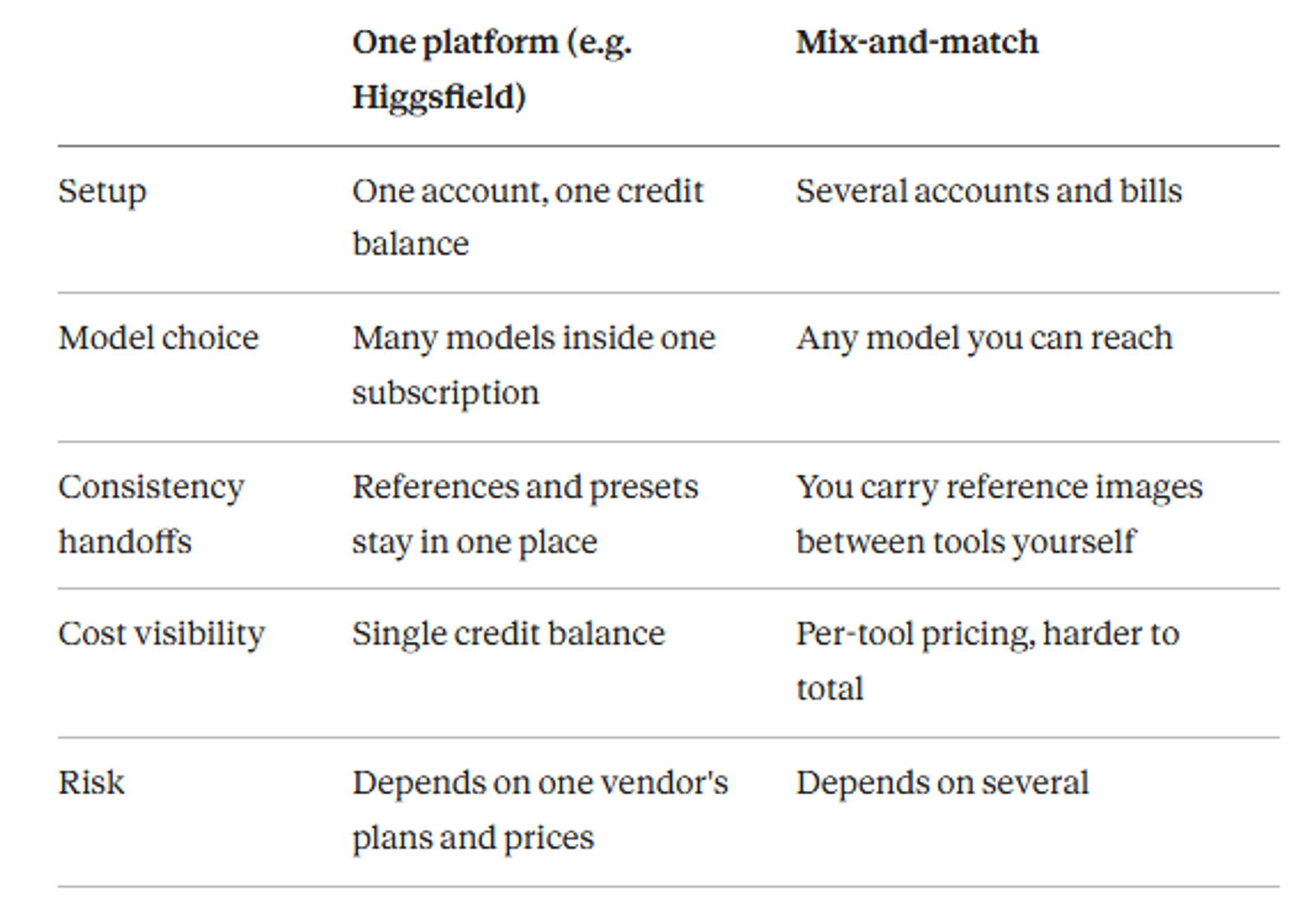
Higgsfield's own guide naturally recommends its own suite, so weigh that. The leaderboard gap also means the "best" model changes often, as our real AI video leaderboard shows.
7. What It Costs
Direct answer: Footage costs roughly $0.27 to $0.78 per second at current public prices, before retakes, voice, music, and editing time.
The inputs come from vendor pages, not from my own purchases: Higgsfield's Cinema Studio 4.0 at 1080p charges 80 credits for 5 seconds, about $3.92 at its Plus plan rate ($49 for 1,000 credits). Runway Standard prices a 10-second Gen-4.5 clip at about $2.88, and Pika's Creator plan prices a 10-second Seedance 2.5 clip at 720p at about $2.71, both per Higgsfield's pricing comparison. The rest is my arithmetic.
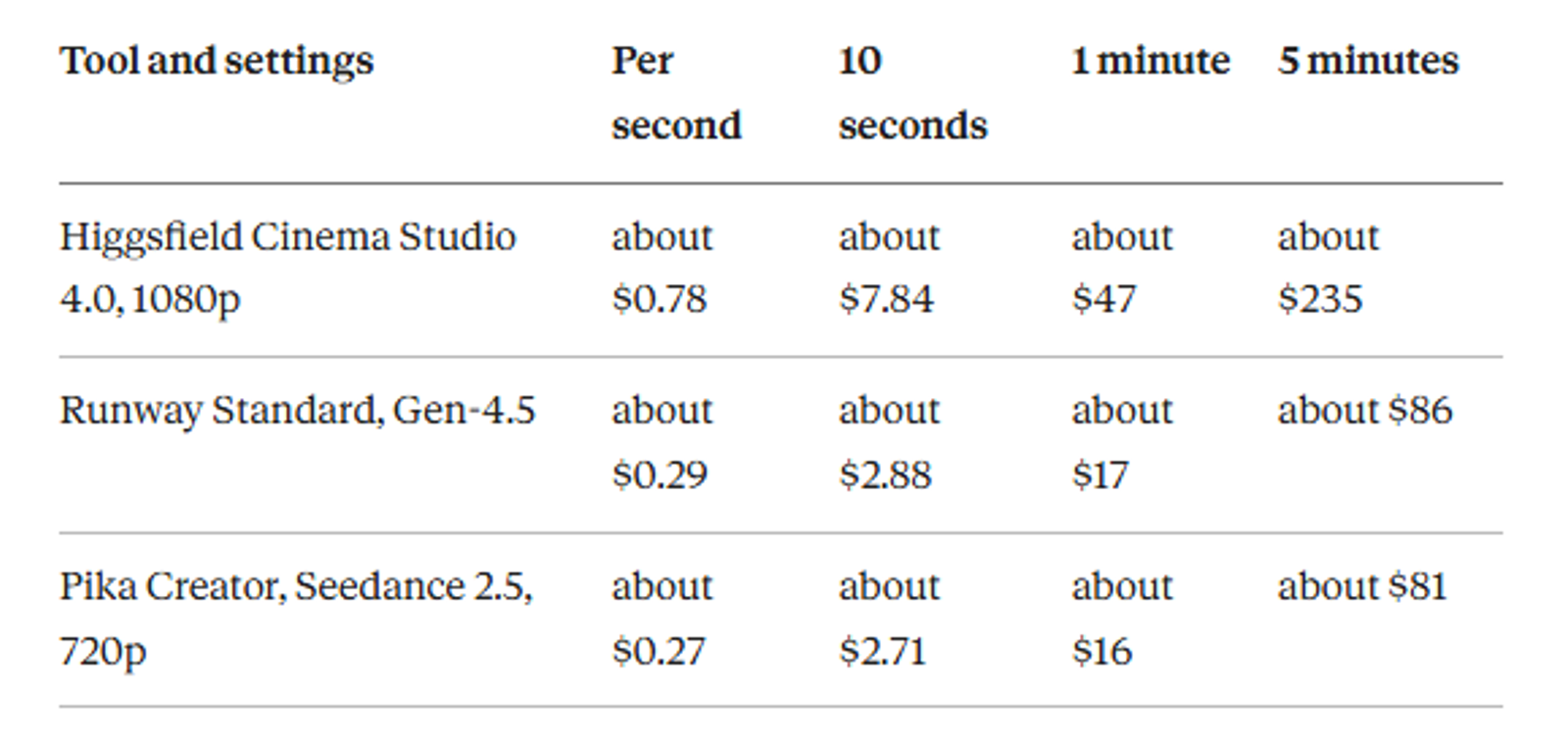
Multiply by four if you generate four versions of every shot: about $31, $12, and $11 for 10 seconds, and $188, $69, and $65 for a minute.
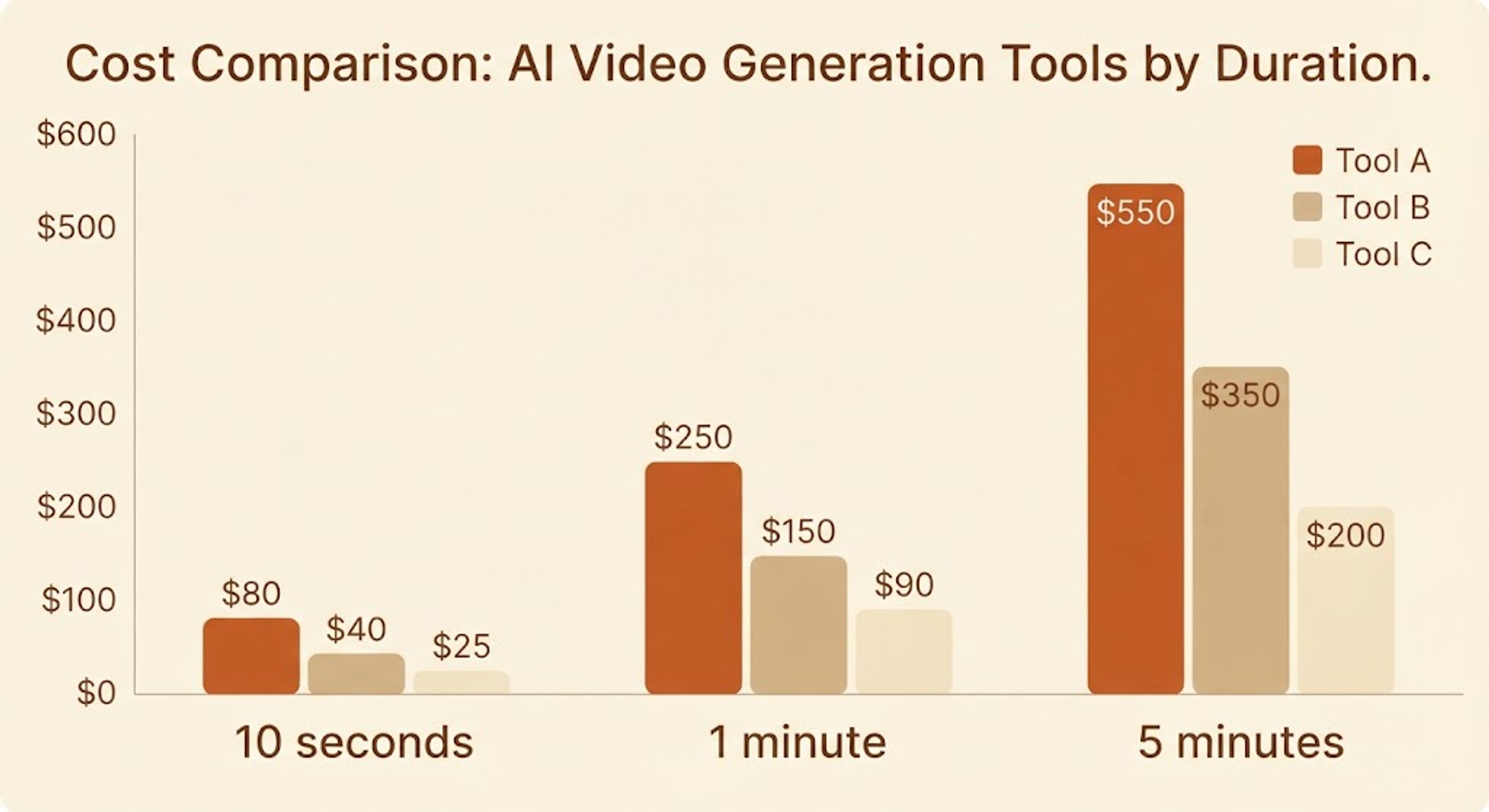
Three caveats. The resolutions differ, so the rows aren't a like-for-like quality comparison. Failed generations are usually refunded automatically, per Higgsfield, but good-looking failures still cost credits. And voices, music, upscaling, and your time are extra.
8. What the Higgsfield Walkthrough Shows, and What It Doesn't
Direct answer: It shows a clean method on one small scene, and it leaves a few things unproven.
Higgsfield's example is a 10-second scene of a girl waiting for the last train at a seaside station, built from three shots with hard cuts at 2.5 and 5.0 seconds. It uses two reference images, a long prompt improved by Supercomputer, and a multishot generation with sound switched on. It also covers fixes, a character-swap tool (Genjutsu Lite, about $1.57 for a 15-second clip at 720p at the Plus rate), and a five-row troubleshooting table.
What it doesn't show, at least in the text I read: a side-by-side of the first prompt versus the improved prompt, any failed attempts, or how many versions the sample took. Its prompt is several hundred words long for 10 seconds, which is a lot to maintain at film length. The transferable lesson is the structure: time ranges, one camera move per shot, locked references, and described sound.
9. Who Should Try This
Good fit: creators who already generate single clips and want to connect them into scenes, small studios prototyping a trailer or short, and anyone who can afford to test a 10-second scene first.
Not a great fit yet: anyone expecting a feature-length film from one prompt, or a quick result without budget for retakes. Treat the first scene as practice. If it works, extend to a minute.
Final Thoughts
AI filmmaking is two skills glued together: directing and budgeting. The generator is the cheap part, and the decisions about shots, references, and retakes are where films succeed or fail.
Start with 10 seconds, three shots, two references. If that works, add a second scene and keep the references the same.
Suggested Related Articles:
Frequently Asked Questions
How long can one AI film scene be?+
It varies by tool. Higgsfield says Cinema Studio 4.0 can generate up to 30 seconds in one go, and longer scenes mean continuing a clip or joining several in an editor.
Do I need a character reference?+
If the same person appears in more than one shot, yes. Without it, faces drift, which is the most common failure.
How do I keep a face consistent across shots?+
Use one character sheet in every shot, keep the outfit simple, and keep shots short. References reduce drift but don't eliminate it.
Can I add sound and dialogue?+
Some tools generate sound with the picture when you describe it. Voices can be generated as a separate track, and dialogue scenes usually need lip-sync tools.
How much does a 1-minute AI film cost?+
Footage alone is roughly $16 to $47 for a minute with no retakes at current vendor prices, and several times that if you generate multiple versions per shot.
Can I make an AI film for free?+
Partly. Free tiers and daily credits exist at some tools, but they rarely cover many retakes, and some restrict commercial use. Check each tool's terms.
Do I have to disclose AI on YouTube?+
Yes, when content is realistic synthetic media, YouTube asks you to disclose it at upload.
Do I have to use Higgsfield?+
No. The method (references, time-coded multishot prompts, fixes, editing) works across tools. Higgsfield's guide uses its own tools, so the exact menus won't match elsewhere.
Keep reading
Suggested Related Articles
How to Add Auto AI Captions to Video Free (Step-by-Step Guide)
Learn how to add auto AI captions to your video for free. Follow simple steps, fix common caption mistakes, and compare free tools like Auto Seedance, CapCut and YouTube.
The Mother's Monster: How a Pakistani Creator's AI Film Hit 50M Views, and 10 AI Movie Generators to Make Your Own
The Mother's Monster, a 28-minute AI film by Pakistani creator Zahid Iqbal, drew 50M+ views by the studio's count. This guide separates what's confirmed from what isn't, shows what a similar film could cost, and compares 10 AI movie generators to try.
GPT-6 Astra in ChatGPT: Who Actually Gets It, and What Free Users Get Instead
GPT-6 Astra is OpenAI's flagship, but most ChatGPT users run Sol or Luna. This guide explains who gets Astra on each plan, how to find it, what it costs, where OpenAI's own benchmark table shows it trailing, and why older guides are out of date.
Claude Startups Program After the Pause: What's Still Free, What Changed, and How to Apply
Anthropic expanded the Claude Startups program on October 6, then paused its free Team year and $1,000 API credit days later. This guide covers what's still available, who qualifies, what the dollar figures mean, and how to apply, with every claim sourced.