
How to Make a Food Product Video Ad With AI in 2026: Full Workflow
The exact prompt structure for making a convincing food product video ad with AI in 2026 — with wrong vs right examples, a full photo-to-ad workflow, and which model fits which shot type.

Umer Khan has spent the last two years building and testing AI-assisted content workflows for YouTube, from scripting to 2D animation. He writes about what actually works in AI video production including the parts that don't.
Quick answer: The single rule that separates a convincing AI food product video from an obviously fake one is this — your prompt should describe camera movement, lighting, and pacing only, and never re-describe the food or packaging itself. Re-describing the product is exactly what causes label drift, color shifts, and warped food textures between generations. Upload your product photo as a reference, write a motion-only prompt, and the product stays accurate while the AI handles everything around it.
Most food ad prompts fail for the same reason — the creator tries to describe the burger, drink, or dessert in words instead of just showing the AI a photo and directing the camera around it. This walks through exactly why that happens and how to avoid it.
1. Why Most AI Food Product Videos Look Fake
Direct answer: Food product videos fail most often because the prompt tries to describe the food itself in words, which forces the AI to reinterpret and regenerate the product's appearance instead of just animating a photo you already have.
Food is especially unforgiving here compared to other product categories. A slightly wrong shade on a beverage can, or a slightly warped bottle shape, is noticeable but forgivable. A burger with the wrong number of sesame seeds, melted cheese that looks structurally wrong, or steam that doesn't match the dish reads as fake almost instantly to a human eye trained on real food photography.
2. The Core Rule: Motion-Only Prompting
Direct answer: A well-structured food product video prompt directs only three things — camera movement, lighting, and pacing — and leaves the actual food or packaging out of the text entirely, because it's already locked in as a reference image.
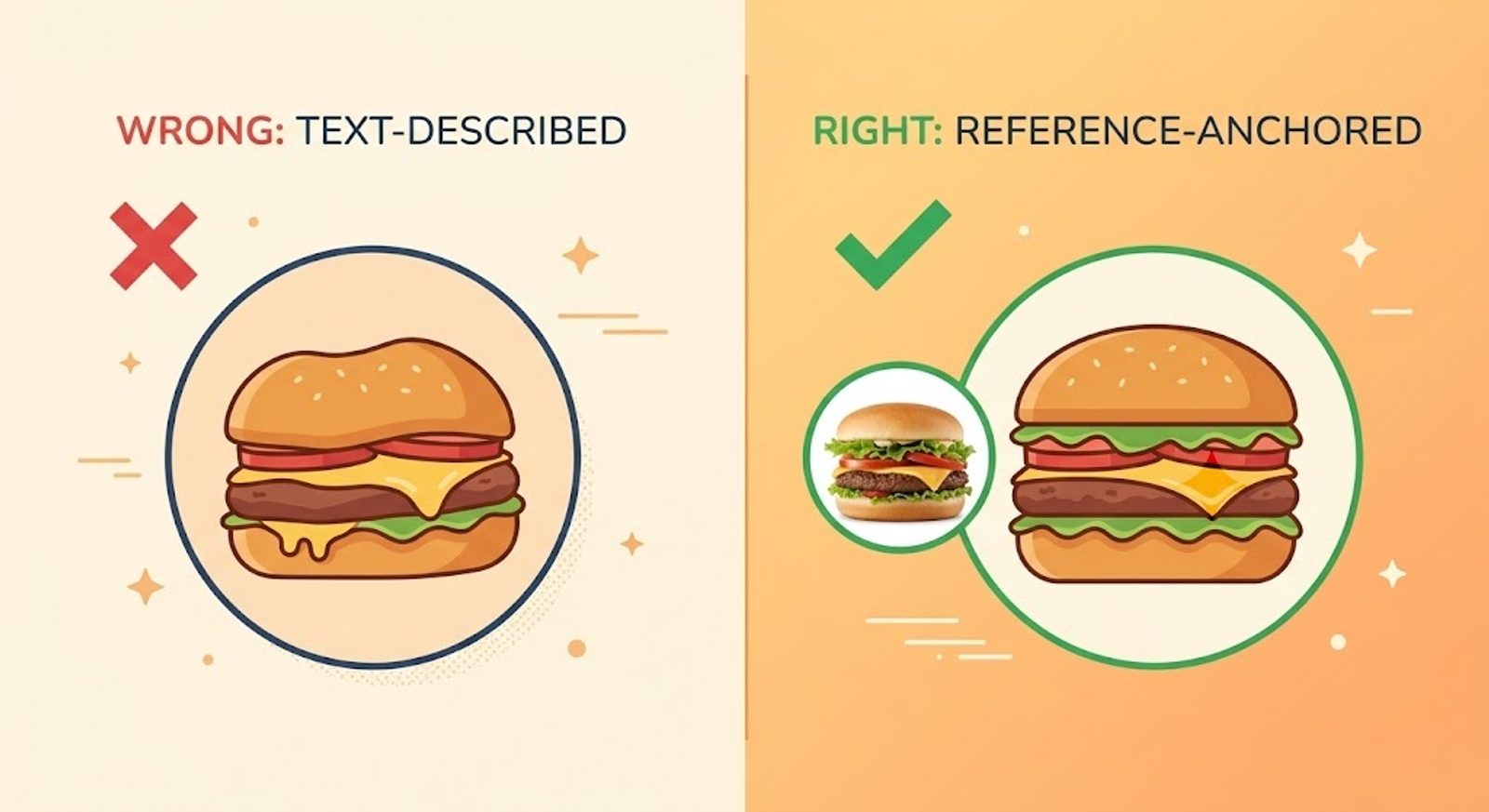
That single rule is what stops label drift and color-shift across multiple generation attempts. When your product photo is wired in as a reference rather than described in text, the model has a fixed anchor to hold onto, rather than reinterpreting "a cheeseburger with melted cheddar" slightly differently every single time.
Why This Matters More for Food Than Other Products
Frontier video models currently hold product coherence cleanly through roughly a 6-10 second window — which happens to match the ideal length for a paid social cutdown anyway. Push past that window with a text-heavy, product-describing prompt, and food-specific details (garnish placement, sauce drips, steam direction) are the first things to visibly drift.
3. Wrong Prompt vs Right Prompt: Real Examples
Example 1: A Burger Reveal Shot
❌ Wrong prompt:
"A juicy cheeseburger with melted cheese, lettuce, tomato, and a sesame seed bun on a wooden table, steam rising, appetizing, professional food photography, cinematic."
Why it fails: this describes the burger from scratch instead of referencing your actual product photo, so every generation reinterprets the burger differently — bun shape, cheese melt pattern, and ingredient placement all shift between takes.
✅ Right prompt (with product photo uploaded as reference):
"Animate this exact burger from the reference image: keep the bun, patty, cheese, and toppings exactly as shown. Slow push-in camera move, low table-level angle, warm natural window light from the left, subtle steam rising gently, shallow depth of field. Appetizing, unhurried pacing, no shape distortion."
Example 2: A Beverage Pour Shot
❌ Wrong prompt:
"Coffee being poured into a cup with steam, cozy cafe vibes, warm lighting, high quality."
Why it fails: too vague on camera behavior, and describing the coffee/cup invites the model to invent its own version rather than matching your actual product.
✅ Right prompt (with product photo uploaded as reference):
"Animate this exact cup and packaging from the reference image, unchanged. Camera at low table-level angle, slow push-in as espresso pours and crema forms on top, soft window-light steam curling upward, shallow depth of field, glistening surface detail. Inviting, unhurried pacing, mouth-watering macro realism."
Example 3: A Packaged Snack Turntable Shot
❌ Wrong prompt:
"A bag of potato chips rotating, studio lighting, product photography, 4K."
Why it fails: "a bag of potato chips" is generic — it doesn't lock in your specific packaging design, brand colors, or label text, so the rotation will show a plausible-looking but inaccurate bag.
✅ Right prompt (with product photo uploaded as reference):
"Animate this exact packaging from the reference image: keep the product, label, and colors exactly as shown. Slow, smooth 360-degree turntable rotation revealing all sides, crisp focus, clean studio lighting throughout, subtle soft reflection on the surface below. Premium commercial feel, steady controlled pacing, no shape distortion."
The One Rule That Fixes All Three
Notice what changes across all three "right" versions: none of them describe what the food or packaging looks like. All three only direct camera, light, and motion, while explicitly instructing the model to keep the reference image's product unchanged.
HOW TO MAKE A FOOD PRODUCT VIDEO AD WITH AI IN 2026: FULL WORKFLOW
4. Full Workflow: Photo to Finished Ad
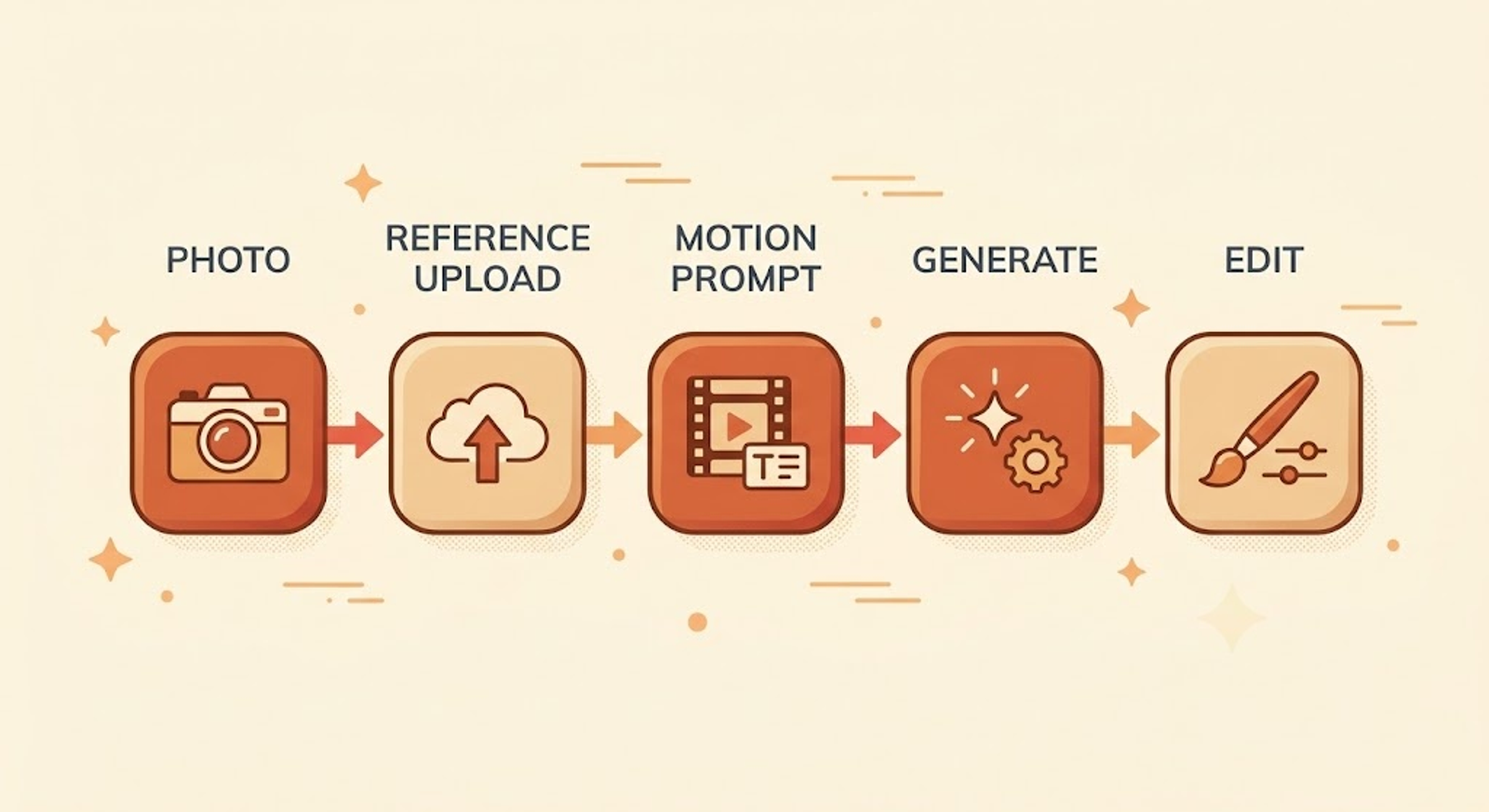
Step 1: Shoot or source one clean product photo. Good natural or studio lighting on the actual food item matters more than any prompt engineering that follows — the reference image is the foundation everything else builds on.
Step 2: Upload that photo as a reference, not a text description. Use an image-to-video tool's reference or "image-to-video" mode specifically, rather than typing what the food looks like into a text-to-video prompt.
Step 3: Write a motion-only prompt using the structure above. Camera movement, lighting direction, pacing, and an explicit "keep exactly as shown" instruction — nothing describing the food itself.
Step 4: Generate within the 6-10 second coherence window. Longer single generations are where product drift becomes most visible, so plan your ad as a series of short clips rather than one long continuous shot if you need more than 10 seconds.
Step 5: Generate 3-5 variations of the same prompt. Motion treatments vary between generations even with an identical prompt, so producing a small batch and picking the cleanest result is faster than trying to perfect one single generation.
Step 6: Edit clips together with captions and a clear offer. Layer your finished clips into a simple edit with on-screen text and a call to action — the video generation is only the visual foundation, not the finished ad.
Step 7: Review for honesty before publishing. Check that nothing in the final clip implies a taste, texture, or effect your actual product doesn't deliver — this matters especially for food, where appetite appeal can tip into misleading territory if steam, texture, or portion size is exaggerated beyond the real product.
5. Which AI Model Fits Which Shot Type?
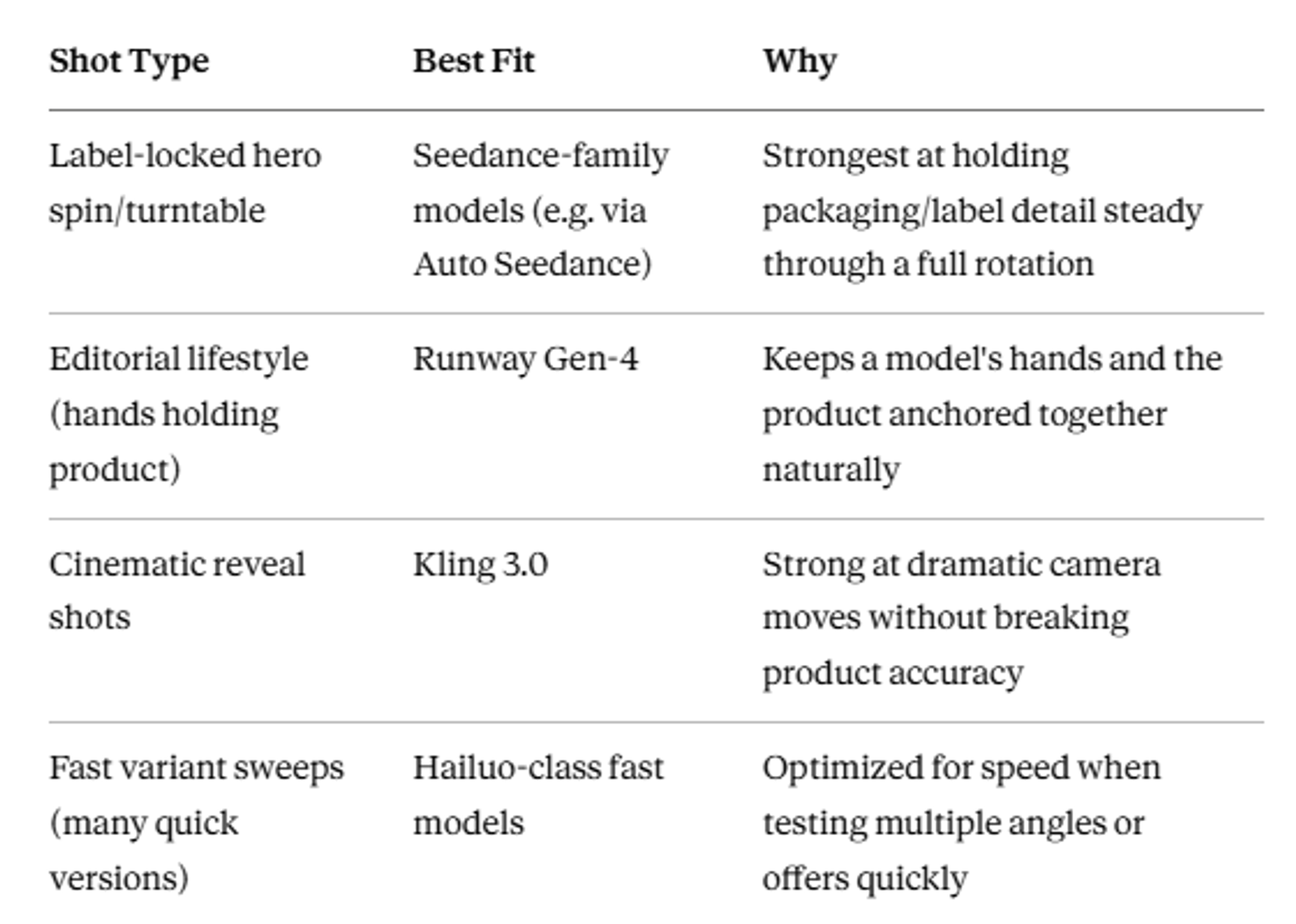
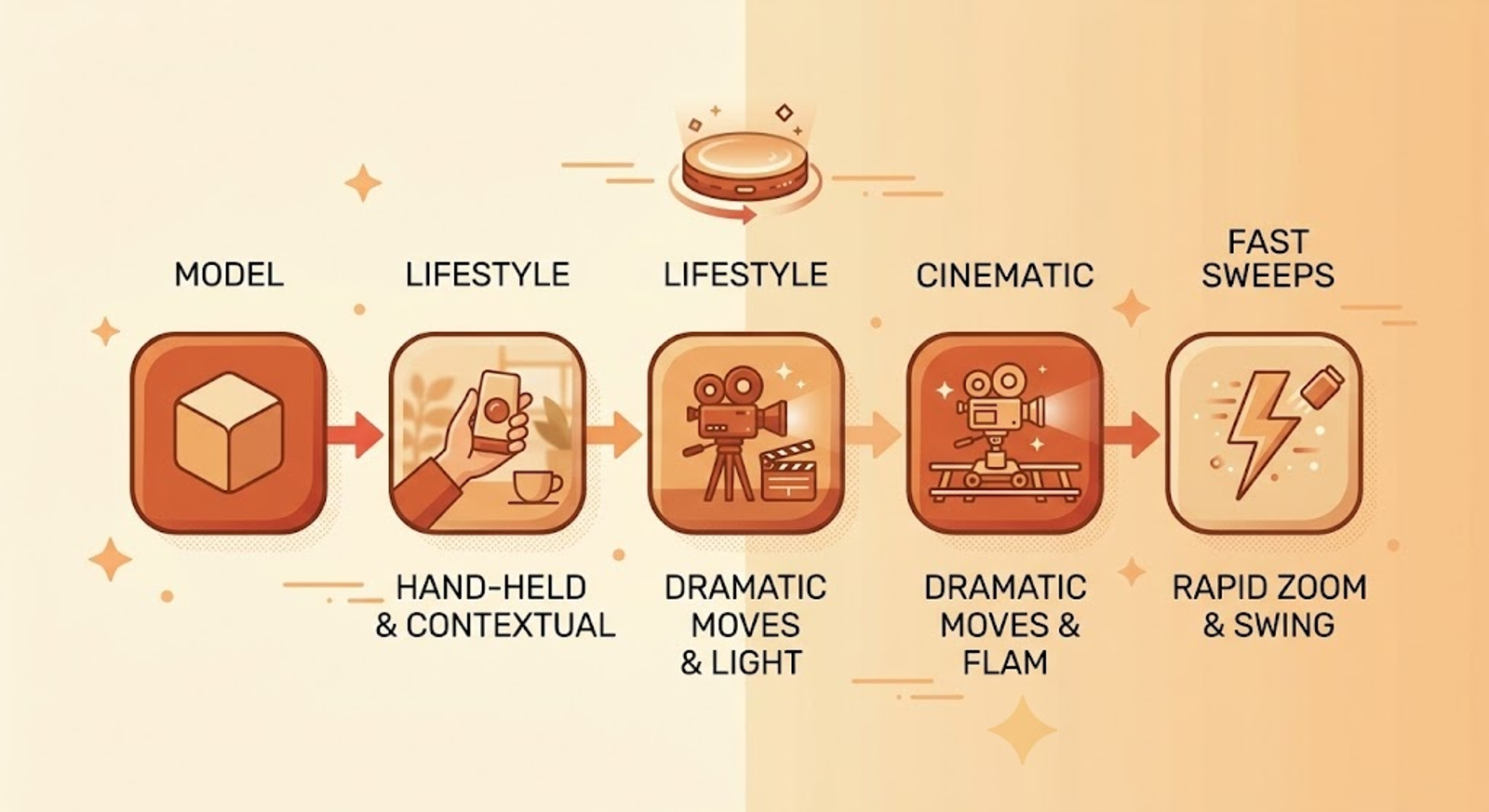
6. Problems and Limitations to Expect
Product drift past the coherence window. Even with a well-structured reference-anchored prompt, expect visible drift if you push a single generation much past 10 seconds — plan multi-clip edits instead.
Text and fine detail still misfire sometimes. Any on-package text or very fine garnish detail can still render inconsistently, a known limitation across nearly every current image-to-video model, not specific to any one tool.
Honesty matters more in food than most categories. Appetite appeal is powerful and easy to oversell with AI — steam, glossiness, and portion size should stay truthful to your actual product, not just visually maximized.
Final Thoughts
None of this requires a film crew or a studio anymore. What it requires is treating your product photo as the fixed anchor and writing prompts that only direct the camera around it, not the food itself.
Get that one rule right, and the rest of the workflow is mostly patience — generate a few variations, pick the cleanest, and edit.
Sources
- Motion-only, reference-anchored prompt structure cross-referenced across multiple independent AI product video prompt libraries published in 2026
- Model coherence window (6-10 seconds) and per-shot-type model recommendations cross-referenced against current product video prompt guides
- Food-specific prompt examples adapted and rewritten for this article, not copied verbatim from any single source
Suggested Related Articles:
Frequently Asked Questions
Why does my AI food video look different from my actual product?+
Most likely your prompt described the food in text instead of using your product photo as a locked reference image — switch to reference-anchored, motion-only prompting.
How long should an AI-generated food product clip be?+
Aim for the 6-10 second window where current models hold product coherence most reliably, then edit multiple short clips together for a longer ad.
What's the single biggest prompt mistake people make with food videos?+
Re-describing the food itself in the prompt text, which causes the model to reinterpret and regenerate it instead of keeping your actual product accurate.
Can I use this same method for drinks, snacks, or desserts?+
Yes — the reference-anchored, motion-only structure applies across food and beverage categories; only the specific camera and motion details change per shot type.
Do I need professional food photography to start?+
Good, clean lighting on the actual product photo matters more than professional equipment — a well-lit phone photo can work as a reference image.
Is it okay to make the food look more appealing than it really is?+
Enhance lighting, motion, and composition, but avoid implying a texture, portion, or effect your actual product doesn't deliver — that crosses from appealing into misleading.
Which tool should I use for the image generation step specifically?+
Reference-anchored image generators built on Seedream/Seedance models handle label-locked, packaging-accurate shots well — Auto Seedance's image generator is one option for that specific step.
Keep reading
Suggested Related Articles
GPT-6 Sol vs Luna: What OpenAI's Pricing Table Actually Means
GPT-6 Sol and Luna launched September 2026 with a pricing table that confused much of Reddit on day one. Here's the real cost breakdown, the naming trap versus GPT-5.6, and which model actually fits your work.
How to Automate Product Video From Your Ecommerce Catalog With AI
AI product video automation actually works two different ways — generative AI and template-based pipelines. Here's the full workflow, which tools fit which job, and what goes wrong once you scale past a handful of products.
10 Best AI Video Generators for Faceless YouTube Channels in 2026 (Real Costs, Real Workflows)
We compared 10 AI video generators for faceless YouTube channels in 2026 — real creator-reported costs, an honest look at one-click vs. manual workflows, and which tool actually fits your format and budget, not just the highest-rated demo reel.
How to Use ChatGPT Images 2.5 for AI Photo Editing
The prompt structure that makes ChatGPT Images 2.5 editing work, plus Sketch, comments, templates, Flare vs Sunburst, pricing, and the real limits.