Seedream 5.0 Pro's Region-Precise Editing Explained (What's Actually New)
ByteDance's Seedream 5.0 Pro introduces region-precise editing — changing one part of an image while leaving the rest untouched. Here's exactly how it works, what it costs, where it still falls short, and what it means for Seedream-based tools like Auto Seedance.

Umer Khan has spent the last two years building and testing AI-assisted content workflows for YouTube, from scripting to 2D animation. He writes about what actually works in AI video production including the parts that don't.
Quick answer: Seedream 5.0 Pro, launched by ByteDance on July 8, 2026, lets you point, lasso, or sketch a specific area of an image and edit only that area — a logo, a product color, a background prop — while everything else in the frame stays untouched. Earlier image models required regenerating the whole image for even a small change. That single shift, called region-precise editing, is the headline feature of this release, and it matters for anyone using a Seedream-based tool, Auto Seedance included.
“ If you've ever generated a near-perfect image and then had to regenerate the entire thing just to fix one detail — a slightly wrong color, an extra finger, a misspelled word on a sign — this update is aimed directly at that frustration. “
1. What Seedream 5.0 Pro Actually Is
Seedream 5.0 Pro is the flagship tier of ByteDance's fifth-generation image model family, sitting above the cost-optimized Seedream 5.0 Lite that launched earlier, in February 2026. Where Lite trades some editing depth for speed, Pro is built specifically for professional and commercial image work — think product catalogs, ad creative, and design layouts, not just casual one-off generations.
The model is proprietary. ByteDance hasn't published weights, checkpoints, or training details, which puts it in the same closed-model category as most of its direct competitors. It's positioned to compete head-to-head with OpenAI's GPT Image 2 and Google's Nano Banana Pro in what's become a genuinely crowded professional image-generation market through 2026.
2. Region-Precise Editing, Step by Step
This is the feature worth actually understanding, since it changes how an editing session works compared to older tools.
Step 1: Generate or upload your base image. Region-precise editing works on both freshly generated images and images you bring in yourself.
Step 2: Mark the exact area you want changed. Seedream 5.0 Pro accepts several ways to do this — a single point, a lasso selection, a bounding box, an arrow, or even a rough sketch drawn directly on the image.
Step 3: Describe or reference the change. You can type a text description, pick a color swatch, provide a material reference, or feed in a second image to pull the replacement detail from.
Step 4: The model edits only that marked region. Everything outside the selection — lighting, background, unrelated objects — stays exactly as it was in the original image.
Step 5: Review the result before using it in production. ByteDance's own launch materials acknowledge that fine text and small pixel-level details inside the edited region can still come out inconsistent, so a manual check before shipping anything commercially is still worth the extra minute.

What makes this different from a normal "inpainting" feature that other tools have offered for a while is how the model locates the region. Seedream 5.0 Pro is described as understanding the "grounding" of an image — where each element sits and what it represents — rather than just masking pixels, which is why a rough sketch or a single point click is enough to identify the right target instead of requiring a precise pixel-perfect mask.
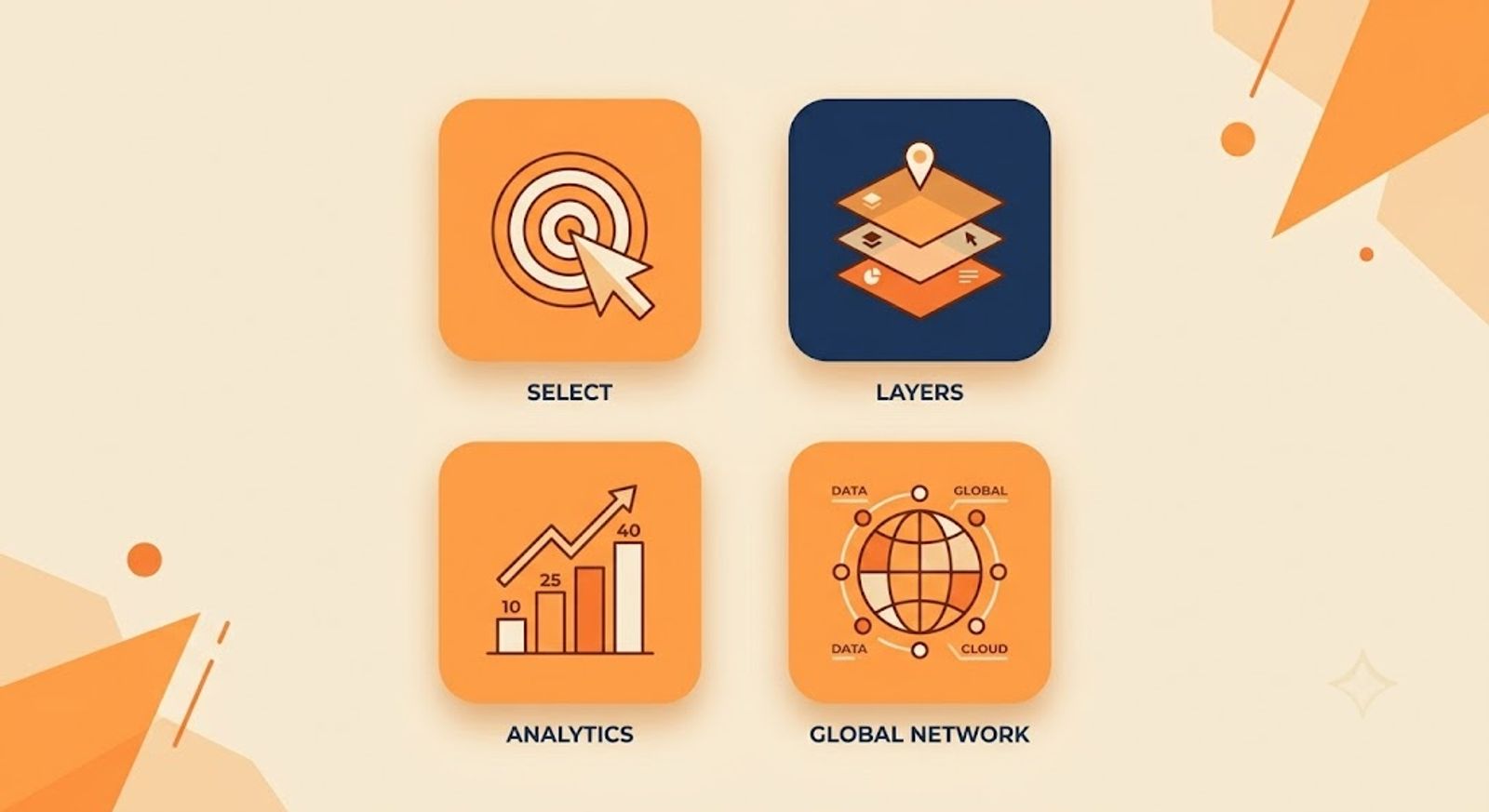
3. The Other Three Upgrades in This Release
Region-precise editing gets most of the attention, but ByteDance frames the release around four connected upgrades, not just one.
Layer separation. A generated or uploaded image can be split into a base background layer plus a set of individual element layers, each exported as a transparent PNG. That turns a single flat image into something closer to an editable design file — drag, scale, and recompose pieces independently, similar to working in a layered design tool rather than a flat picture.
Complex infographic and layout generation. The model can turn raw data, long text, or a rough concept into structured layouts — infographics, posters, UI mockups, and charts — in a single generation pass, keeping small text legible and reading order coherent.
Native multilingual text rendering. Text generates correctly in more than ten languages, including right-to-left scripts like Arabic, with proper letterforms rather than a translate-and-paste look that older models often produced.
Together, these four upgrades point toward the same audience: people doing structured commercial design work, not just generating a single striking image for social media.
What Testing the Feature Set Against Real Use Cases Shows
Based on early third-party coverage rather than a single vendor claim, the region-precise editing feature performs most reliably on larger, clearly defined regions — swapping a product's color, replacing a background prop, adjusting a piece of clothing. Smaller, text-heavy edits inside a marked region are where independent reviewers and ByteDance's own release notes both flag ongoing inconsistency. That pattern lines up with a broader, well-documented limitation across nearly every current image model — legible small text is still one of the hardest things to render reliably, regardless of which company built the model.
Recommended For You:
- Why AI Character Consistency Is the Biggest Problem Nobody's Solved Yet
- TikTok's Symphony Agent Runs on Seedance 2.0
- 10 Best Free AI Content Creator Tools in 2026
4. What It Costs
Seedream 5.0 Pro is priced at $0.075 per image up to 2.36 megapixels, rising to $0.150 above that resolution, with an additional $0.005 charge per extra reference image beyond the first. The Pro tier supports up to 10 reference images per generation, useful for multi-person composites or product shots built from several source photos.
For consumer access rather than direct API use, Seedream models are also available through ByteDance's Dreamina platform, which includes free daily credits similar to earlier Seedream releases. That consumer path is the more relevant one for most individual creators, since the per-image API pricing above is aimed at developers building it into their own tools.
5. Where It Still Falls Short
ByteDance's own launch materials are unusually direct about this, which is worth taking seriously rather than dismissing as standard corporate hedging. Fine-grained text rendering inside an edited region and pixel-level editing consistency are both flagged as open gaps, not solved problems.
In practice, that means region-precise editing is strongest for larger structural changes — a color, a material, an object swap — and weakest for small, precise text corrections inside a busy region. If you're using this for packaging mockups or product labels with fine print, plan on a manual review pass before anything goes to a client or a live campaign, exactly as ByteDance itself recommends.
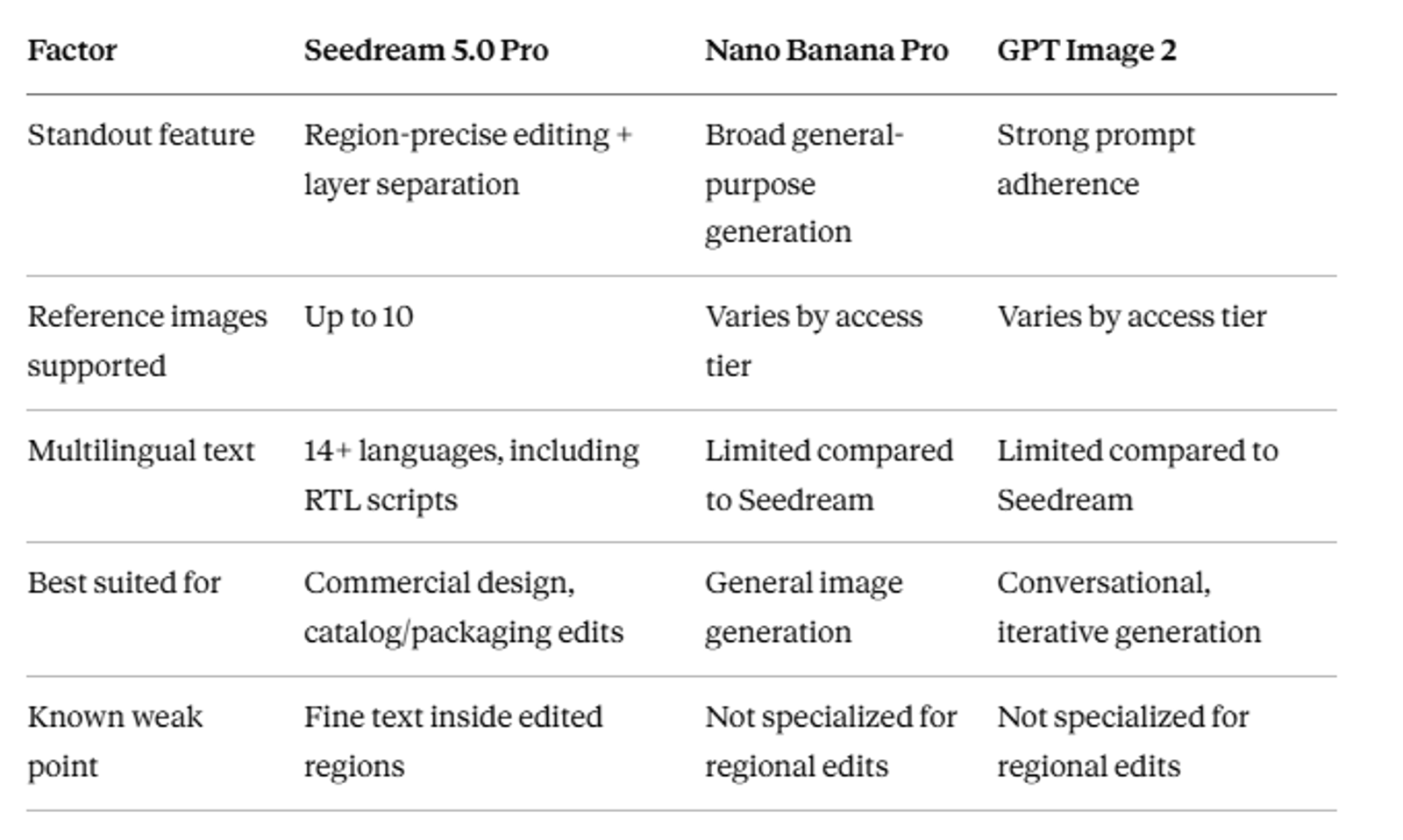
6. Seedream 5.0 Pro vs Nano Banana Pro vs GPT Image 2
7. What This Means for Auto Seedance Users
Full transparency here, same as we've said about every Seedance-related update: Auto Seedance and ByteDance's own consumer platforms use models from the same Seedream and Seedance families, but they're separate products, not the same tool wearing a different name. Whether or not Seedream 5.0 Pro's specific improvements reach Auto Seedance depends on which model version is integrated into the tool at any given time, which we haven't independently confirmed as of this article's publish date.
What's genuinely useful to know regardless of which specific version you're using: the direction ByteDance is pushing the whole Seedream line is toward precise, targeted editing rather than full-image regeneration for every small fix. If you've been frustrated by having to regenerate an entire scene to fix one small detail — a common complaint we've heard from readers of our character consistency guide — this is the kind of capability that directly addresses that pain point, at the model-development level.
8. Common Misunderstandings About This Update
- "This means AI image editing is now perfect." ByteDance's own release notes flag real limitations in fine text and pixel-level consistency — this is a genuine step forward, not a finished solution.
- "Seedream 5.0 Pro replaces Seedream 5.0 Lite." They're positioned as two different tiers for different needs — Lite trades some editing depth for speed and cost, not a discontinued predecessor.
- "This is automatically available in every Seedream-based tool now." Access depends on which specific model version each individual product has integrated, and that varies by tool.
- "Region-precise editing is the same as basic inpainting." The grounding-based approach — understanding what an element is, not just masking pixels — is what distinguishes it from older, more manual masking tools.
9. Who Should Care About This Right Now
Worth exploring: anyone doing product photography, catalog work, packaging design, or ad creative where small, targeted edits are a constant, repetitive need rather than a one-off task.
Can wait: casual creators generating one-off images for social posts, where regenerating a full image for a small change isn't a real bottleneck in the first place.
Final Thoughts
The headline here isn't that AI image editing suddenly became flawless. It's that the direction shifted — from "regenerate the whole thing and hope the rest stays similar" to "point at the one thing that's wrong and fix just that."
That's a real, practical difference for anyone doing repetitive design work. It's also, by ByteDance's own admission, still a work in progress on the details that matter most for polished commercial output.
Key Takeaways
- Seedream 5.0 Pro, launched July 8, 2026, introduces region-precise editing — changing one part of an image via point, lasso, or sketch selection while the rest stays untouched
- Three additional upgrades ship alongside it: layer separation, complex infographic generation, and native multilingual text in 14+ languages
- Fine text rendering and pixel-level editing consistency remain open weaknesses, by ByteDance's own admission
- Pricing runs $0.075-$0.150 per image via API; consumer access through Dreamina includes free daily credits
- Auto Seedance uses models from the same Seedream family, though specific version integration isn't something we've independently confirmed
Frequently Asked Questions
What is region-precise editing in Seedream 5.0 Pro?+
It's a feature that lets you mark a specific area of an image — by point, lasso, box, or sketch — and edit only that area, leaving the rest of the image unchanged.
Is Seedream 5.0 Pro free to use?+
Direct API access is paid, priced per image. Consumer access through ByteDance's Dreamina platform includes free daily credits, similar to earlier Seedream releases
How is this different from regular AI inpainting?+
Seedream 5.0 Pro is described as understanding an image's "grounding" — what each element is and where it sits — rather than just masking pixels, which is why a rough point or sketch is enough to target the right area.
Does Auto Seedance use Seedream 5.0 Pro specifically?+
Auto Seedance uses models from the Seedream and Seedance families, but which specific version is integrated at any given time isn't something we've independently confirmed as of this article.
What's the biggest limitation of this update?+
Fine-grained text rendering and pixel-level consistency inside edited regions — flagged directly in ByteDance's own release materials as areas still needing improvement.
How does Seedream 5.0 Pro compare to GPT Image 2 and Nano Banana Pro?+
Seedream 5.0 Pro's standout advantage is its combination of region-precise editing and layer separation; the other two are strong general-purpose generators without that same specialized editing focus.
Who benefits most from this update?+
Creators and teams doing repetitive, targeted image edits — product catalogs, packaging, ad creative — benefit most, since that's exactly the workflow region-precise editing is built to speed up.
Keep reading
Suggested Related Articles
GPT-6 Sol vs Luna: What OpenAI's Pricing Table Actually Means
GPT-6 Sol and Luna launched September 2026 with a pricing table that confused much of Reddit on day one. Here's the real cost breakdown, the naming trap versus GPT-5.6, and which model actually fits your work.
How to Automate Product Video From Your Ecommerce Catalog With AI
AI product video automation actually works two different ways — generative AI and template-based pipelines. Here's the full workflow, which tools fit which job, and what goes wrong once you scale past a handful of products.

10 Best AI Video Generators for Faceless YouTube Channels in 2026 (Real Costs, Real Workflows)
We compared 10 AI video generators for faceless YouTube channels in 2026 — real creator-reported costs, an honest look at one-click vs. manual workflows, and which tool actually fits your format and budget, not just the highest-rated demo reel.
How to Use ChatGPT Images 2.5 for AI Photo Editing
The prompt structure that makes ChatGPT Images 2.5 editing work, plus Sketch, comments, templates, Flare vs Sunburst, pricing, and the real limits.