
How to Automate Product Video From Your Ecommerce Catalog With AI
AI product video automation actually works two different ways — generative AI and template-based pipelines. Here's the full workflow, which tools fit which job, and what goes wrong once you scale past a handful of products.

Umer Khan has spent the last two years building and testing AI-assisted content workflows for YouTube, from scripting to 2D animation. He writes about what actually works in AI video production including the parts that don't.
You don't need a studio, a videographer, or a two-week production schedule to get video for every product in your catalog anymore. You need clean product images, a bit of product data, and one of two automation approaches — and most guides on this topic never actually tell you which one you need.
Here's the short version: AI product video automation works in one of two ways. Either an AI model generates motion from your product photos (a still image becomes a moving clip), or a template pulls your product data — name, price, image, offer — into a fixed video design that repeats across your whole catalog. They solve different problems, they use different tools, and picking the wrong one is the main reason people say "I tried this and the output looked cheap." This guide walks through both, how to set up the workflow, which tools actually fit which job, and what tends to go wrong once you scale past a handful of products.
1. Two Different Things Are Called "AI Product Video Automation"
This is the part almost every article on this topic skips over, and it's the first decision you need to make.
Generative AI video takes a product photo and creates new motion around it — a camera pan, a floating effect, a lifestyle background that never existed in the original photo, or even an AI presenter holding and talking about the product. Tools like Runway, Kling, PixVerse, and Veo work this way. The output can look genuinely cinematic, but the AI is inventing pixels, which means fine details — logo text, packaging copy, small print — can warp or blur between frames.
Template-based video automation doesn't generate anything new visually. It takes a video design you build once, with placeholders for a product image, name, price, and CTA, and swaps in the real data for every SKU in your feed. The visuals stay exactly what you designed; only the content changes. This is closer to a mail-merge for video than to AI generation, and it's why a tool like Plainly (built on After Effects templates) or Higgsfield's catalog-to-template workflow can produce hundreds of accurate, on-brand videos without a single distorted logo.
Which Approach Answers Which Question
Neither approach is "better" — they answer different questions:
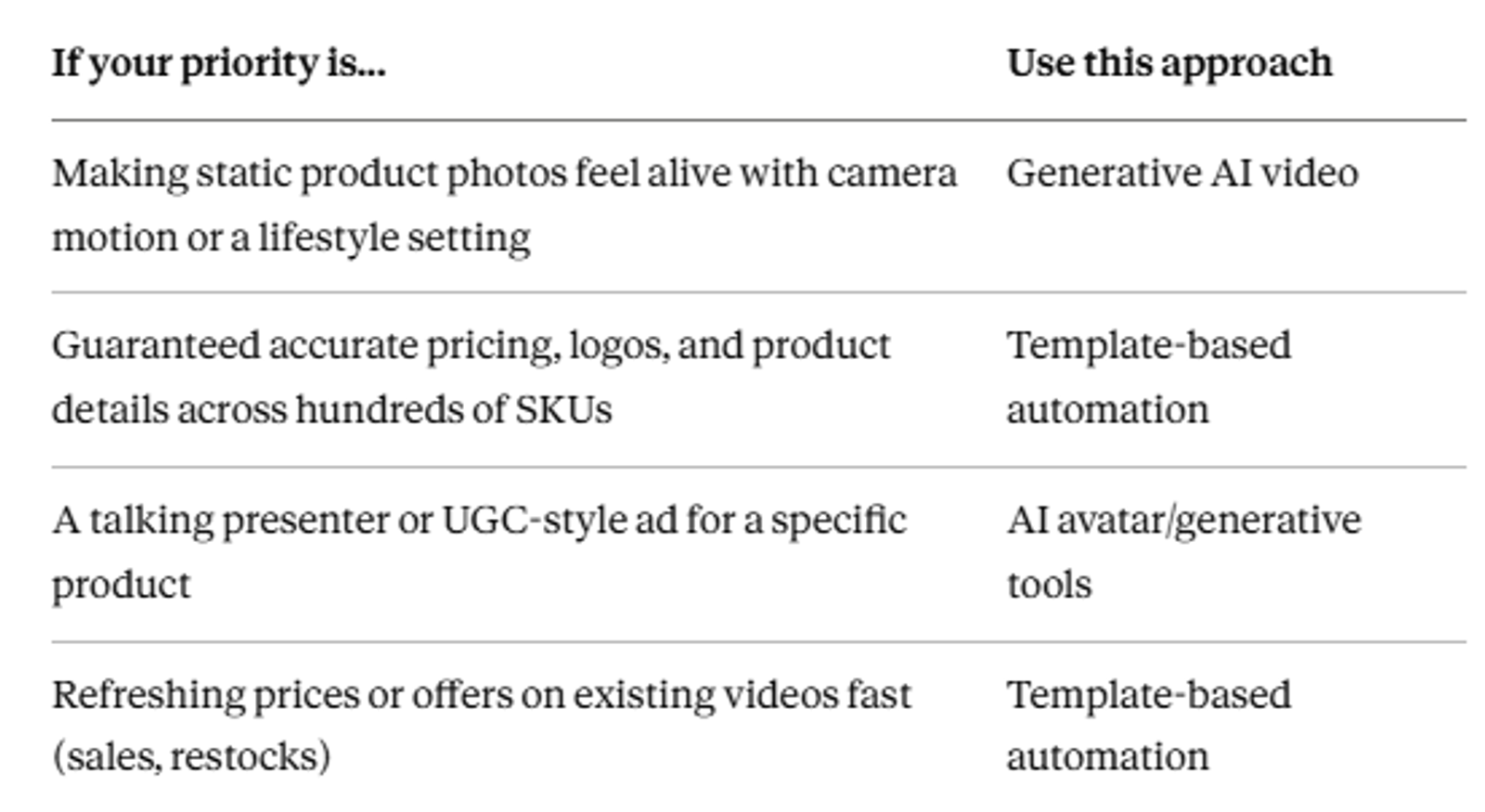
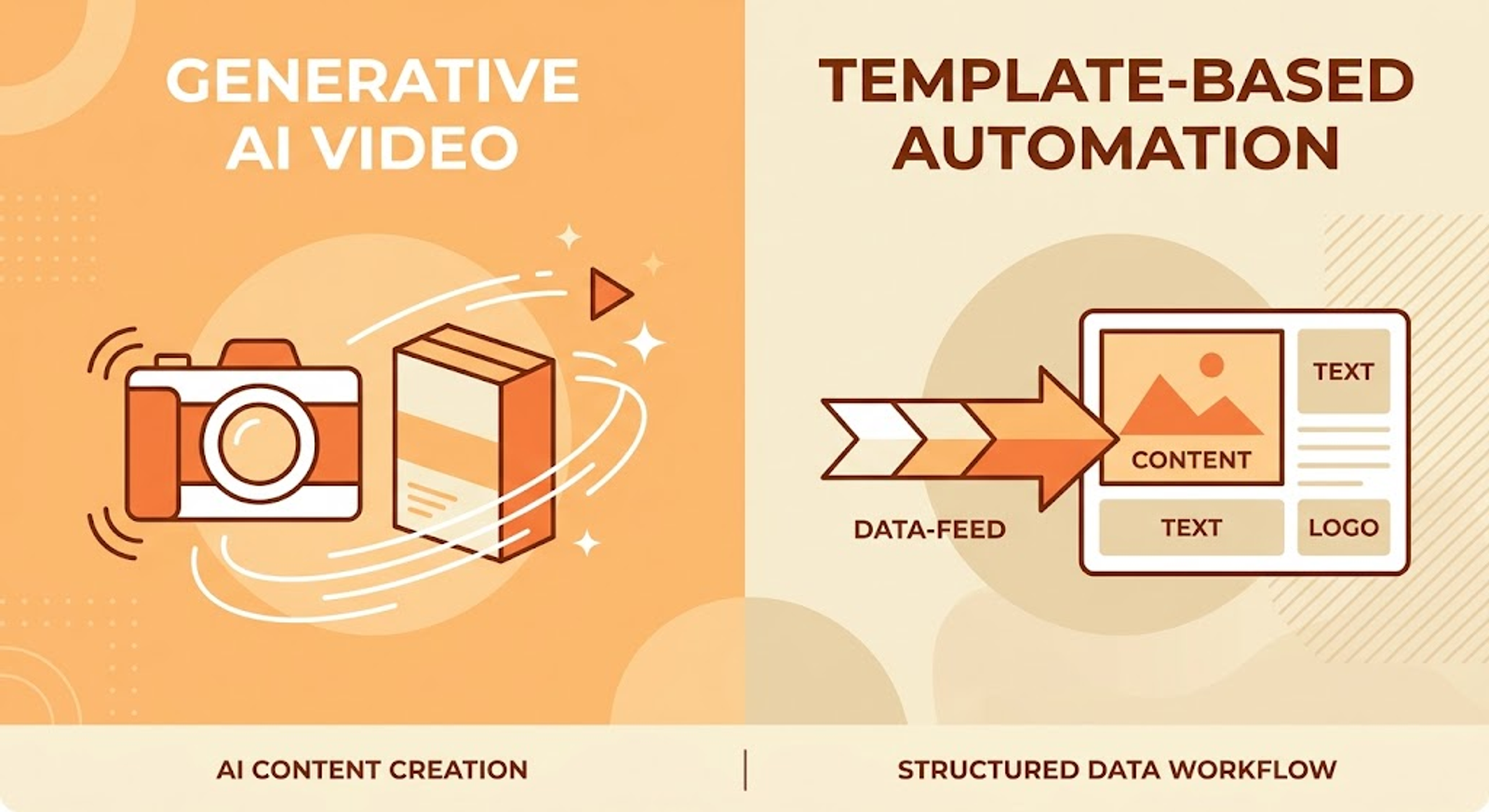
Most stores end up using both: a template pipeline for the bulk of the catalog, and generative AI for a handful of hero products or seasonal campaigns where a more cinematic look is worth the extra review time.
2. What You Need Before You Automate Anything
Whichever approach you pick, the automation runs on the same core inputs:
- Product photos — clean, well-lit, simple backgrounds work far better than busy or cluttered shots, especially for generative tools
- Product name and SKU
- Price and any active offer or discount
- A short description or feature list
- Target channel — product page, Instagram Reel, TikTok, marketplace listing, email — since this decides aspect ratio and length before you generate anything
If you run Shopify, WooCommerce, or another standard platform, this data usually already exists as a product feed. Most platforms let you export it as a CSV, and video tools built for catalog automation accept that CSV, a JSON feed, or a direct API/webhook connection.
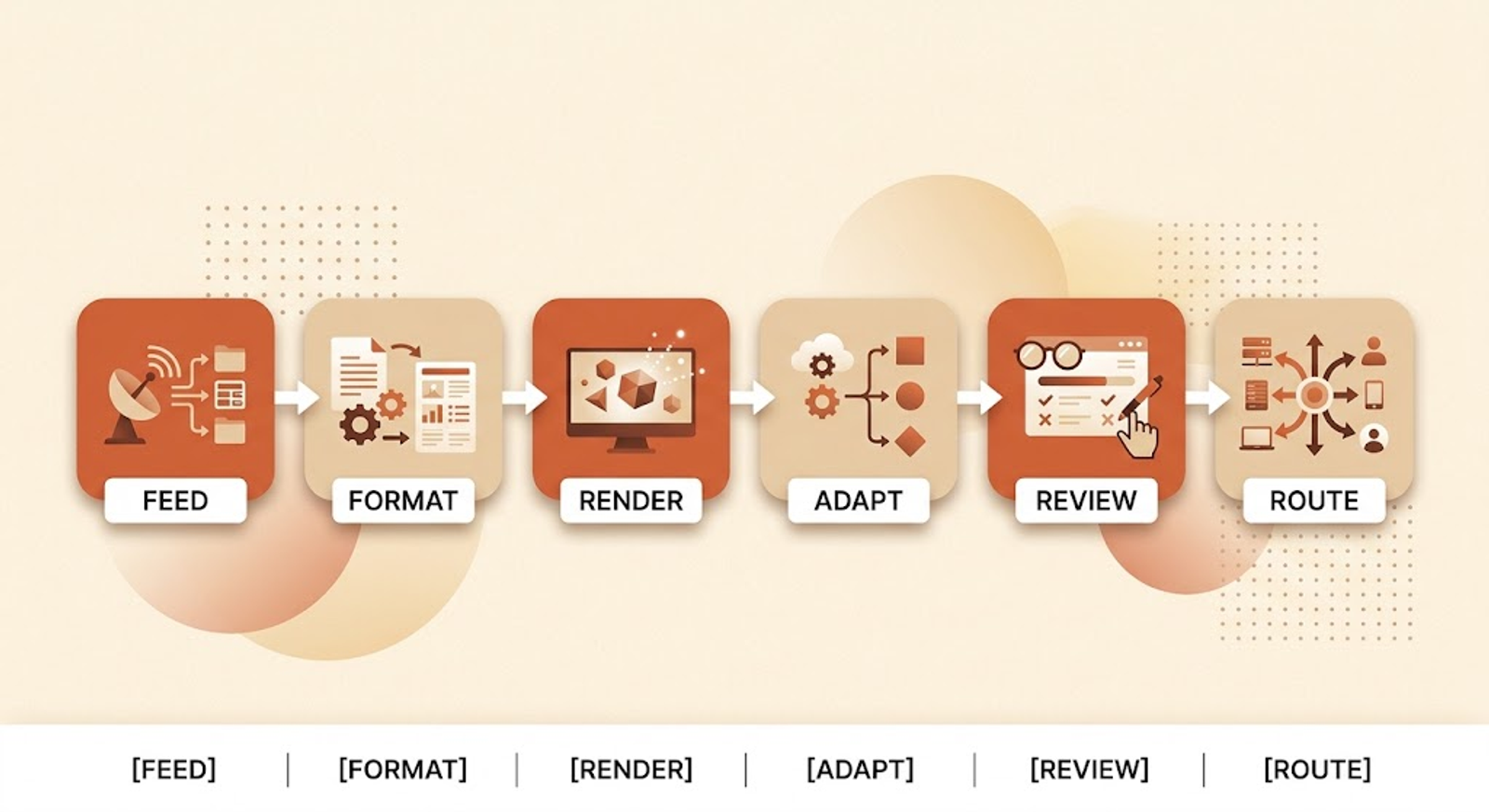
3. Building the Workflow, Step by Step
Step 1: Get your catalog data into a usable format. Export your product feed and check it before anything else touches it — missing images, broken product names, or long descriptions that don't fit a template cause more failed videos than any AI model's limitations do. Testing a small batch of 5-10 products before running the full catalog catches these problems early.
Step 2: Pick your format per product category. A clothing item, a piece of electronics, and a cosmetic product don't need the same video structure. Group your catalog by category and design (or generate) one master version per group — a hero shot style for one category, a feature-callout style for another — rather than trying to force one template across everything.
Step 3: Generate or render per SKU. For generative tools, this means sending each product image through the model with a prompt describing camera movement, lighting, and background. For template tools, this means connecting your feed so each row becomes one rendered video with the matching image, name, and price dropped in. Either way, this step should run as a batch job in the background, not one clip at a time.
Step 4: Adapt for each channel. A base video rarely ships as-is everywhere. You'll typically need a vertical (9:16) cut for TikTok/Reels, a square (1:1) for feed ads, and a horizontal or square silent loop for the product page. Some platforms handle this reframing as a separate step from the original generation — plan for it rather than discovering it after the fact.
Step 5: Review before publishing. This is the step people skip when they're excited about automation, and it's the one that prevents the most damage. A quick human check for product accuracy, correct pricing, and any visual glitches before anything goes live is worth the few minutes it costs.
Step 6: Route the output. The finished video should land somewhere useful automatically — a shared drive, your CMS, a social scheduler — rather than sitting in a folder no one opens again.
4. Prompt Basics for Generative Product Video
If you're using an image-to-video model rather than a template, prompt quality is most of the difference between a usable clip and a wasted generation.
Be specific about camera movement instead of vague creative direction — "slow dolly push toward the product, three feet away, soft studio lighting" produces far more consistent results than "make it look good." Describe the environment explicitly too: a marble countertop and morning light for a lifestyle shot, or a plain white background and centered framing if you want a clean product-only clip. Most models also support negative prompts, so specifying "no text, no distortion, no extra hands" helps keep the output focused on the product itself.
Build a small library of prompts that work for each product category once you find them. That's what actually makes generative AI practical at catalog scale — you're reusing a proven pattern, not reinventing the prompt for every new item.
Recommended For You:
5. Where AI Video Automation Actually Fits, by Job
There's no single tool that covers every use case well, whatever an individual tool's own marketing suggests. Reviewers who've tested multiple platforms side by side generally split them by job.
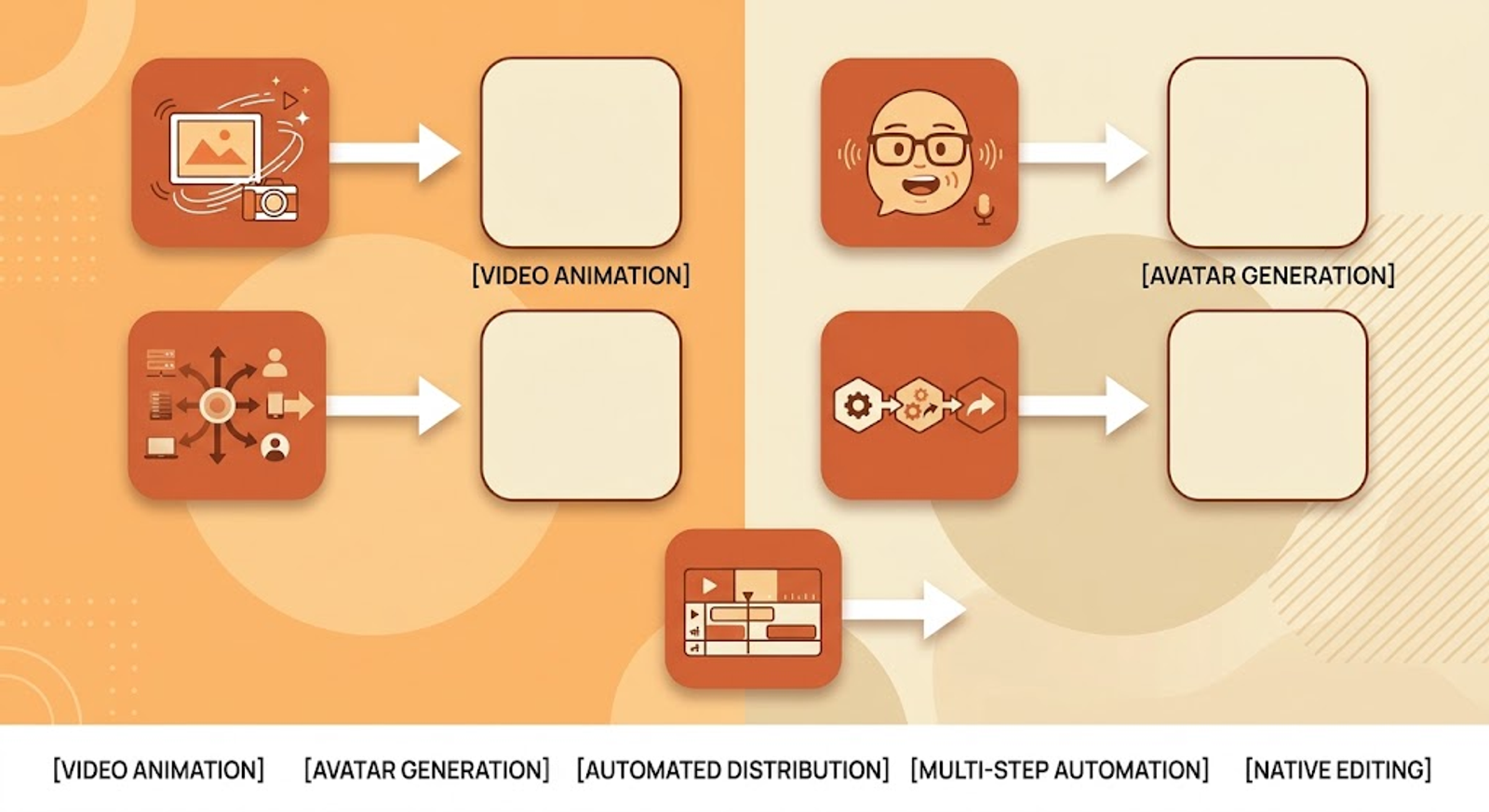
Turning a still photo into product motion. Tools built specifically for image-to-video — PixVerse, Runway, Kling — animate a static shot into a slow orbit, a texture reveal, or a subtle drift. They hold up best on clean product shots with simple shapes; complex packaging or small label text is where they're most likely to distort between frames, so plan on regenerating a share of clips rather than expecting every attempt to work first try. This is the same underlying limitation covered in more depth in our guide on why AI character consistency is still broken — fine detail accuracy across frames is a well-documented weak point across nearly every current model, not specific to one tool.
AI presenter or UGC-style ads. For a "person" talking about or holding your product, avatar tools like HeyGen and Synthesia, or UGC-focused tools like Creatify and Arcads, generate a talking-head or product-in-hand clip from a script. These work well for paid social where a human face helps stop the scroll, but they don't show product motion — pair them with an image-to-video clip if you need both.
Data-driven template automation at scale. For a large catalog where accuracy matters more than cinematic flair, tools built around a feed-to-template pipeline (an After Effects template rendered through a service like Plainly, or a catalog-to-template API like Higgsfield's) keep your design fixed while swapping in real product data. This is the only approach in this list where price, SKU, and logo text stay exactly what you typed, since nothing is being visually regenerated.
Orchestrating multiple models in one pipeline. Larger catalogs often need more than one model — an avatar for the hook, a video model for product motion, an editor for the final cut — chained together rather than run as separate manual steps. Node-based or workflow-builder platforms exist specifically to chain these steps and swap the underlying model without rebuilding the whole flow, which matters because the leading video model tends to change every few months.
Finishing and editing. None of the generation tools are a full editor. Captions, background music, trims, and export formatting for each platform typically happen in a separate editing step — CapCut and Descript are common choices for this, and they're usually fast enough to keep up with a batch of freshly generated clips.
Where an Image Generator Like Auto Seedance Fits Specifically
Full transparency, consistent with how we've described this tool elsewhere on this site: Auto Seedance handles the image-generation and image-to-video step specifically — useful for the "turning a still photo into product motion" job above, or for generating a clean product shot from scratch before it enters either pipeline. It isn't a template-to-catalog automation platform on its own, so for the "data-driven template automation at scale" job, a dedicated feed-to-template tool remains the more direct fit.
6. Is There a Genuinely Free Way to Do This?
Search interest around "free" and "free without watermark" for this topic is high, so it's worth answering honestly: mostly, no — not without trade-offs.
Free tiers exist across nearly every tool in this space, but they come with real limits. Some free plans cap you at a handful of videos per month at lower resolution. Others give you a batch of one-time credits that don't renew. Several explicitly withhold commercial usage rights on the free tier, meaning anything you generate for free is for testing only, not for running as a live ad — so check the terms before publishing free-tier output anywhere public. Watermarks are also common on entry-level plans specifically to push you toward a paid tier for clean, publishable video.
If your catalog is small — under a couple dozen SKUs — a free tier can genuinely get you through your first batch of test videos. Once you're generating consistently across a real catalog, budget for a paid plan; the cost per finished video is usually a small fraction of a traditional shoot regardless, even on entry pricing.
7. What Actually Goes Wrong (and How to Avoid It)
People who've run this at scale consistently report the same handful of problems, and most of them are avoidable with a bit of planning up front.
Product details drift. Generative models sometimes alter or blur logos, colors, or packaging text — occasionally without you noticing until a customer points it out. This is exactly why generative AI video is a stronger fit for lifestyle and motion shots than for close-up detail shots where accuracy matters. If a product's selling point is the packaging itself, a template-based clip with an untouched product photo is the safer choice.
Credit systems get confusing fast. Several tools price generation in credits rather than a flat per-video cost, and real usage often runs higher than the headline numbers suggest once retries are counted. It's worth calculating your actual cost per approved, usable clip — not per generation attempt — before committing to a plan at volume.
Consistency across a batch is harder than one good clip. Getting a single impressive video is very different from getting fifty consistent ones. If the same product needs to look identical across several shots or scenes, this is where generative tools are most likely to struggle, and where a fixed-template approach tends to hold up better.
Aspect ratio gets fixed after the fact instead of before. Generating in one format and cropping later produces misframed or cut-off subjects. Decide your target aspect ratio — 9:16 for TikTok and Reels, 1:1 for feed posts, 16:9 for a product page or YouTube — before you generate, not after.
Full automation with zero review creates real risk. A single distorted product or wrong price making it to a live ad is a bigger cost than the few minutes a lightweight approval step takes. Even routing outputs to a shared channel for a quick human scan before publishing closes most of this gap.
8. Choosing an Approach Based on Catalog Size
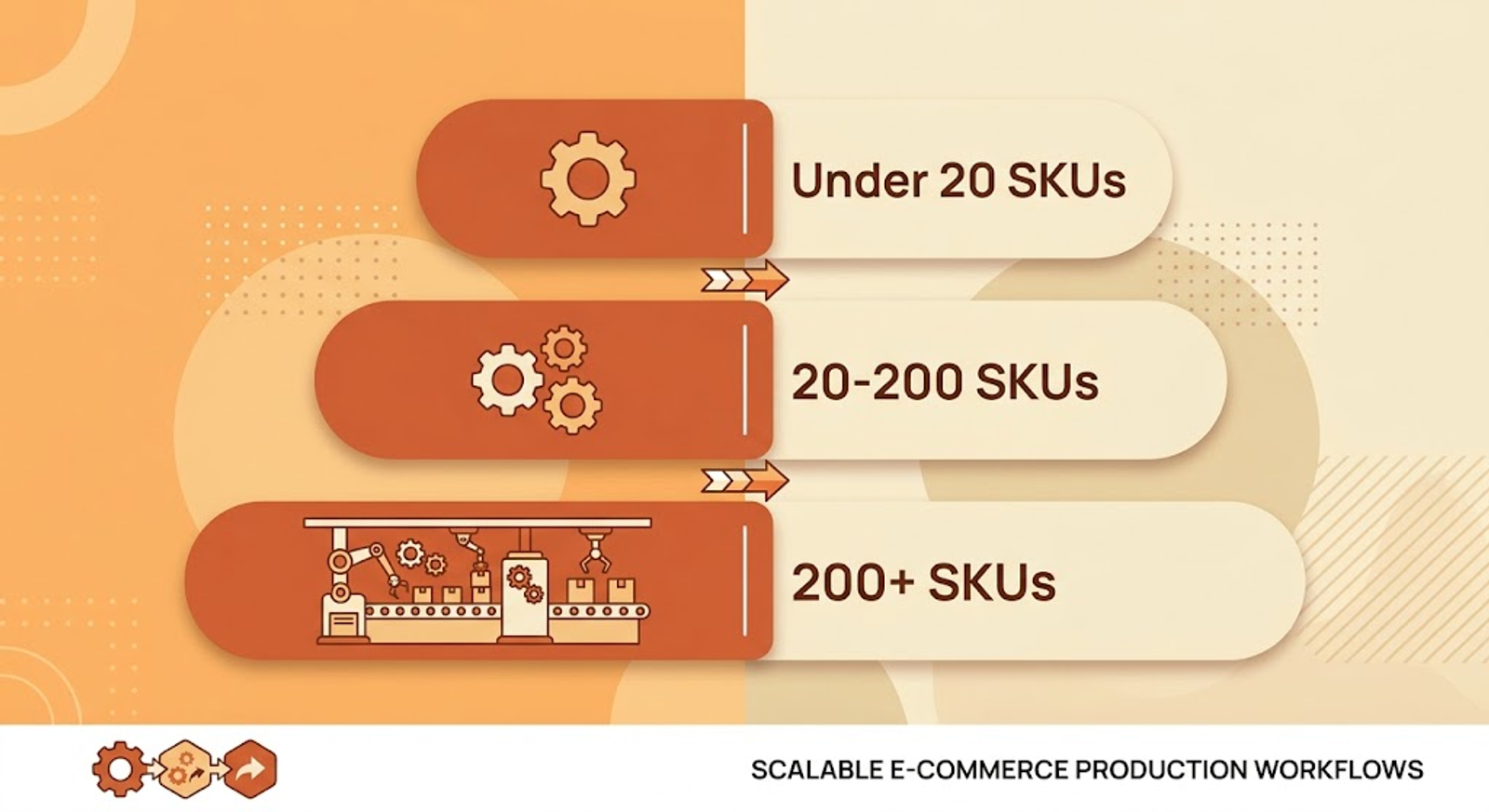
- Under 20 SKUs: Pick one tool that matches your main use case — an image-to-video tool for product motion, or a UGC tool for ad testing — and stay inside it rather than building a multi-tool pipeline you don't need yet.
- 20-200 SKUs: You want real batch capability, plus one specialist tool reserved for a handful of hero products where extra polish is worth the manual attention.
- 200+ SKUs: At this point the process matters more than any single generator. A template-driven pipeline, or an orchestration layer that chains several models together, is usually the only setup that stays manageable as your catalog keeps changing.
Final Thoughts
Catalog-wide product video isn't one problem with one tool — it's two different problems that happen to share the word "automation." Generative AI earns its place on hero products and lifestyle shots. Template-based pipelines earn theirs the moment accuracy across hundreds of SKUs matters more than cinematic flair.
Most stores that get this right aren't picking one approach. They're matching the right one to the right part of the catalog.
Suggested Related Articles:
Frequently Asked Questions
Should I use generative AI or template-based automation for my catalog?+
It depends on your priority — generative AI suits lifestyle motion and hero products, while template-based automation is the safer choice when pricing and logo accuracy across hundreds of SKUs matters most.
Can I automate product video directly from my Shopify or WooCommerce feed?+
Yes — export your product feed as a CSV, JSON, or connect it via API/webhook to a catalog-automation tool built to accept that format.
Is there a genuinely free way to automate product video at scale?+
Not without trade-offs — free tiers typically cap volume, resolution, or withhold commercial usage rights, making them suitable for testing rather than live, at-scale publishing.
What's the biggest risk with fully automated product video?+
Product detail drift — logos, packaging text, or pricing rendering incorrectly — which is why a human review step before publishing is worth keeping even in an automated pipeline.
Do I need different videos for TikTok, Instagram, and my product page?+
Yes — aspect ratio and length should be decided before generation: 9:16 for TikTok/Reels, 1:1 for feed posts, and 16:9 or square for a product page.
How many products do I need before a template-based pipeline makes sense?+
Once you're past roughly 200 SKUs, a template-driven or multi-model orchestration pipeline generally becomes the only setup that stays manageable as the catalog changes.
Can generative AI tools like Auto Seedance handle full catalog automation on their own?+
Not the template/data-driven side — image-to-video tools handle the motion-generation step well, but a dedicated feed-to-template platform is the more direct fit for accuracy-critical, catalog-wide automation
Keep reading
Suggested Related Articles

GPT-6 Sol vs Luna: What OpenAI's Pricing Table Actually Means
GPT-6 Sol and Luna launched September 2026 with a pricing table that confused much of Reddit on day one. Here's the real cost breakdown, the naming trap versus GPT-5.6, and which model actually fits your work.

10 Best AI Video Generators for Faceless YouTube Channels in 2026 (Real Costs, Real Workflows)
We compared 10 AI video generators for faceless YouTube channels in 2026 — real creator-reported costs, an honest look at one-click vs. manual workflows, and which tool actually fits your format and budget, not just the highest-rated demo reel.

How to Use ChatGPT Images 2.5 for AI Photo Editing
The prompt structure that makes ChatGPT Images 2.5 editing work, plus Sketch, comments, templates, Flare vs Sunburst, pricing, and the real limits.
How to Create 1980s-Style AI Images From Your Photos
The exact four-part prompt formula for a convincing 1980s AI photo — plus why faces distort, real privacy trade-offs, and the backlash nobody else is covering.